# How to use PHPCS with WordPress Coding Standards?
> Learn how to install and run PHPCS with WordPress Coding Standards locally and in projects. From global setup to Composer scripts, you'll see how to keep your plugins and themes clean, consistent, and review-ready.
Published: 2025-09-07T22:06:58.000Z
Author: Shameem Reza
Category: WordPress
Canonical: https://shameemreza.com/phpcs-with-wordpress-coding-standards/
---
Messy code slows teams down and leads to subtle bugs. When I started shipping plugins, I realized my code wasn't always WordPress enough. Naming, spacing, escaping, small things, but they add up when your work gets reviewed or handed off to another developer.
That's where **[PHPCS](https://github.com/squizlabs/PHP_CodeSniffer) (PHP_CodeSniffer)** and the **[WordPress Coding Standards (WPCS)](https://github.com/WordPress/WordPress-Coding-Standards)** come in. The WordPress Coding Standards (WPCS) give us a shared rulebook, and PHPCS enforces it automatically.
Instead of debating style in pull requests, I let PHPCS enforce the rules. It catches:
- Escaping mistakes.
- Deprecated functions.
- Naming or file structure issues.
- Inconsistent whitespace and braces.
And the best part: most of it can be auto-fixed with `phpcbf`.
### My setup
I run PHPCS two ways: globally (for quick checks) and project-local (so teams get the same rules).
Global install:
```
composer global require squizlabs/php_codesniffer
```
To check it works, you can run `phpcs -i`. You'll see a list of built-in standards like `PSR1`, `PSR2`, `PSR12`, `Squiz`.
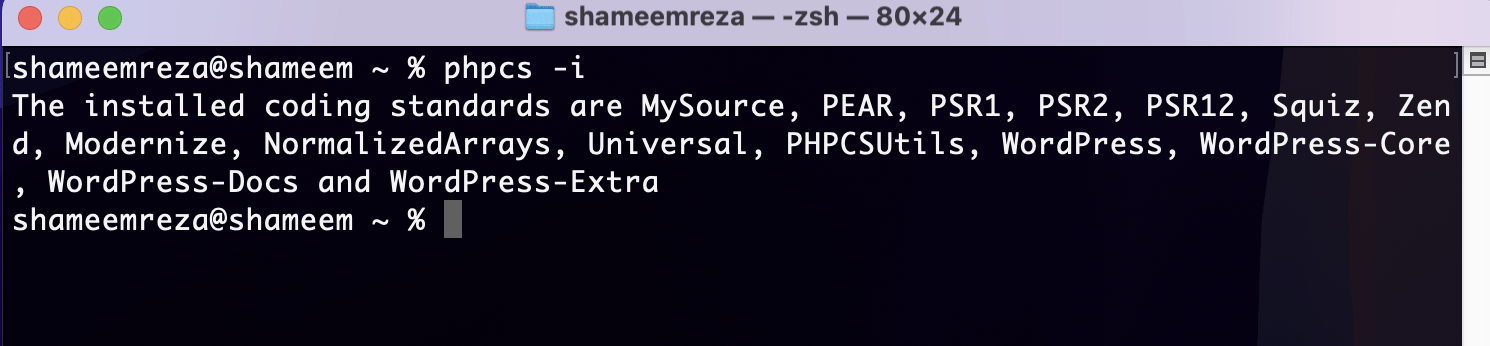
Once PHPCS installed, it's time to install WordPress coding standard. To install it globally, you can run this:
```
composer global require wp-coding-standards/wpcs
```
Then tell PHPCS where to find the rules:
```
phpcs --config-set installed_paths ~/.composer/vendor/wp-coding-standards/wpcs
```
Now `phpcs` knows about the WordPress rules, and you can check again using `phpcs -i`. Now you should see `WordPress`, `WordPress-Core`, `WordPress-Extra`, `WordPress-Docs`.
**Per project:**
For teams, lock PHPCS and WPCS into your repo, so everyone runs the same version:
```
composer require --dev squizlabs/php_codesniffer wp-coding-standards/wpcs dealerdirect/phpcodesniffer-composer-installer
```
This locks versions in your repo, so new devs don't have to fiddle with configs.
Then I add a `.phpcs.xml`:
```
./
*/vendor/*
```
This checks everything except vendor files. If I need to disable Yoda conditions (I usually do):
```
```
You can also tweak properties (like text domains):
```
```
### Running it
\It's simple, just run:
```
vendor/bin/phpcs
```
To auto-fix issues where possible:
```
vendor/bin/phpcbf
```
That's it. PHPCS shows violations, `phpcbf` fixes what it can.
### Editor integration
I use VS Code with the [PHP Sniffer & Beautifier](https://marketplace.visualstudio.com/items?itemName=ValeryanM.vscode-phpsab) extension. You can also use the [PHP Sniffer](https://marketplace.visualstudio.com/items?itemName=wongjn.php-sniffer)extension too. Point it to `vendor/bin`, enable format on save, and PHPCS runs silently in the background. No debates in PRs, no nitpicking in code reviews.
### In CI
If your project is on GitHub, adding a quick Action means every push runs PHPCS. Example `.github/workflows/phpcs.yml`:
```
name: PHPCS
on: [push, pull_request]
jobs:
lint:
runs-on: ubuntu-latest
steps:
- uses: actions/checkout@v3
- name: Install Composer deps
run: composer install --no-progress
- name: Run PHPCS
run: vendor/bin/phpcs
```
Following WPCS isn't about passing a checklist. It's about writing code other WordPress devs can read without thinking. PHPCS just automates the boring part.
Once you set this up, you'll notice how much cleaner your diffs and pull requests look, and how much easier it is to pass reviews on [WordPress.org](https://wordpress.org/) or [WooCommerce.com](https://woocommerce.com/).