

On this page
A merchant had spent hours trying to add a “How did you hear about us?” dropdown to their checkout. A dropdown block in the editor, a checkout field editor plugin, a PHP snippet their site’s AI assistant wrote for them. Everything installed cleanly, nothing appeared on the page. The code wasn’t broken. All of it was written for a checkout their store no longer uses.
Their checkout page holds the woocommerce/checkout block, which most new stores have had as the default since WooCommerce 8.3. The hooks that a decade of tutorials rely on, woocommerce_before_order_notes and its siblings, live in the classic PHP templates and never fire when the block renders the page. The snippet sat there registered and waiting for a hook call that never came. That’s why nothing errored and nothing appeared, the worst kind of failure to debug.
Why the old snippets fail without a trace
The block checkout isn’t a PHP template with hooks sprinkled through it. It’s a React app talking to the Store API, so woocommerce_form_field() and the classic woocommerce_checkout_* hooks have nowhere to run. This is the same lesson as the time I chased a WooCommerce notice with no off switch: the answer wasn’t on a settings screen or in a tutorial, it was in the source.
For a while the honest options were a block-aware plugin or a custom checkout block extension with a JS build step. That gap is what the Additional Checkout Fields API closed, and it seems to have gone mostly unnoticed. Most search results still point at the classic hooks.
One function call replaces all of it
woocommerce_register_additional_checkout_field() shipped as a stable API in WooCommerce 8.9, replacing the earlier __experimental version. You give it an id, a label, a location, and a type, and core does the rest: rendering the field in the checkout form, validating it, saving it to the order, and showing it in the right places afterward.
Three field types are supported, text, select, and checkbox, defined in CheckoutFields.php inside core. Fields can go in three locations: contact puts them under the email address, address adds them to the billing and shipping forms, and order places them in the Additional information step near the order notes.
The snippet
/**
 * Add a "How did you hear about us?" dropdown to the block checkout.
 *
 * Uses the Additional Checkout Fields API (WooCommerce 8.9+). The answer
 * saves to the order automatically, no save handler needed.
 */
add_action( 'woocommerce_init', function () {
	if ( ! function_exists( 'woocommerce_register_additional_checkout_field' ) ) {
		return; // WooCommerce below 8.9, do nothing.
	}
	woocommerce_register_additional_checkout_field(
		array(
			'id'       => 'my-store/lead-source',
			'label'    => 'How did you hear about us?',
			'location' => 'order',
			'type'     => 'select',
			'required' => false,
			'options'  => array(
				array( 'value' => 'google', 'label' => 'Google' ),
				array( 'value' => 'facebook', 'label' => 'Facebook' ),
				array( 'value' => 'instagram', 'label' => 'Instagram' ),
				array( 'value' => 'podcast', 'label' => 'Podcast' ),
				array( 'value' => 'trade_show', 'label' => 'Trade Show' ),
				array( 'value' => 'newsletter', 'label' => 'Newsletter' ),
				array( 'value' => 'word_of_mouth', 'label' => 'Word-of-mouth' ),
				array( 'value' => 'other', 'label' => 'Other' ),
			),
		)
	);
} );
Swap my-store for your own namespace and edit the options to match where your customers actually come from. The function_exists guard means the snippet quietly does nothing on an older WooCommerce instead of taking the site down.
Where to add the code
Add it to your child theme’s functions.php, or manage it with a plugin like Code Snippets or WPCode. No settings screen, no build step. It starts working on save.
What you get
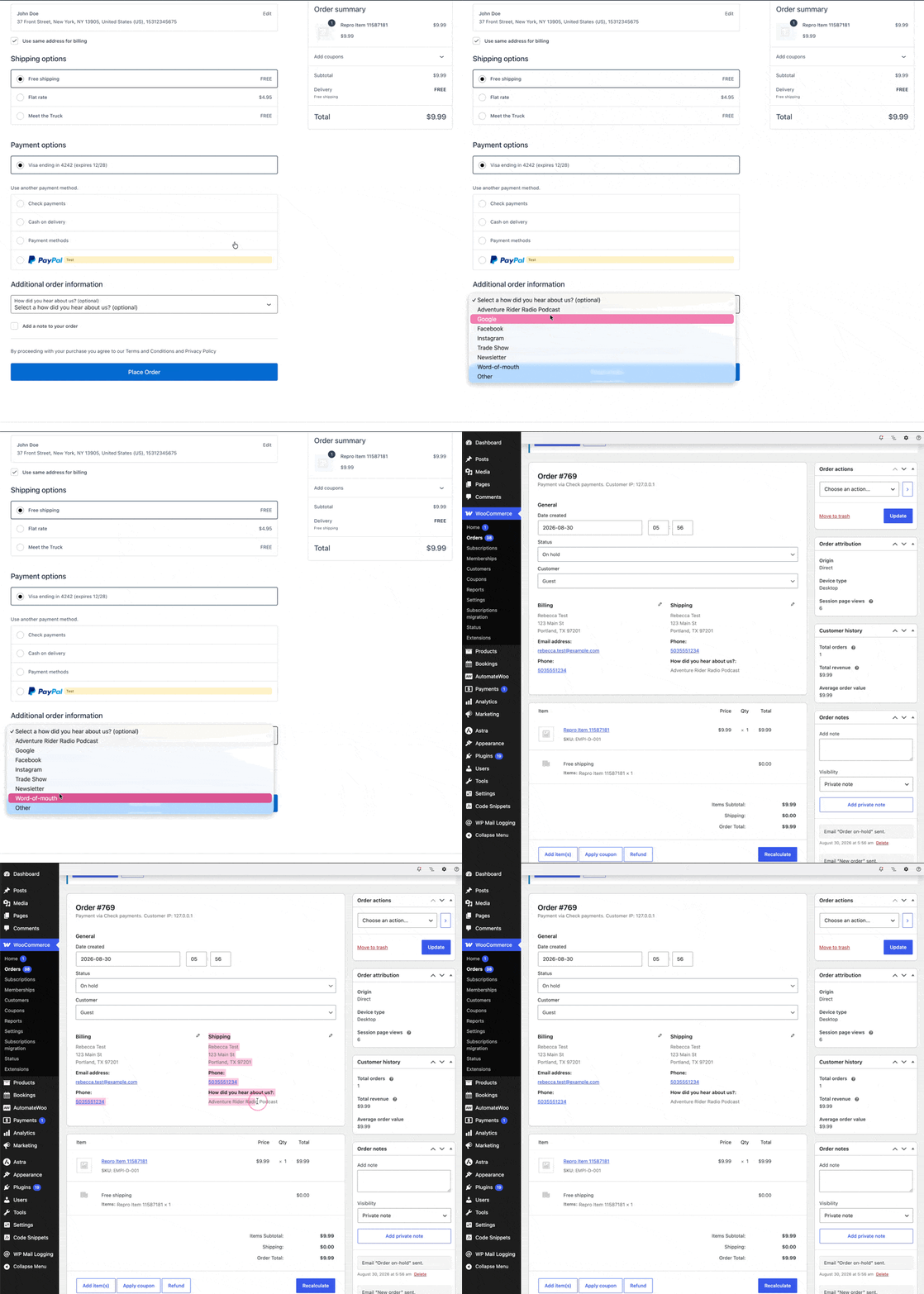
The dropdown renders in the Additional information step of checkout, above the order notes. When a customer picks an option and places the order, the answer shows up in two places with no extra code: on the order confirmation page under Additional information, and on the order edit screen in wp-admin, where it appears in the Shipping column right below the phone number as an editable field.
How the saving works
You never touch $_POST. Core’s CheckoutFields service persists the value through the order object, $order->update_meta_data(), under a namespaced meta key. For the snippet above that key is _wc_other/my-store/lead-source. Because it goes through the CRUD layer, storage doesn’t matter: HPOS stores write it to wp_wc_orders_meta, classic stores write it to wp_postmeta, same snippet either way.
The admin display comes from core too. A CheckoutFieldsAdmin service injects every registered order field into the order edit screen through the woocommerce_admin_shipping_fields filter, options list and all. That’s the part every classic tutorial made you write by hand.
Edge cases worth knowing
A few things I confirmed while testing this on WooCommerce 11.0.1, so they don’t surprise you later.
- Express checkout buttons (Apple Pay, Google Pay, WooPay) skip the checkout form entirely, so orders placed through them carry no answer.
- The field and its admin display only render while the snippet is active. Deactivating it hides the saved answers but never deletes them, they stay in the order meta.
- The API is checkout-only. There is no
cartlocation, so a cart page field still means real custom development. - There’s no Orders list column or built-in report. You see the answer per order, and a CSV export carries the meta key if you want to count answers across orders.
That last point matters for why you’d want this field at all. For measurable channels, WooCommerce’s built-in Order Attribution already records where each order came from with no code. What it can’t capture is the customer telling you “a podcast” or “a friend”. The dropdown covers exactly the sources attribution can’t see, and the two work well side by side.
If you’ve hit another spot where the block checkout quietly ignored a classic recipe, I’d like to hear which one.

Shameem Reza Happiness Engineer at Automattic
I fix WooCommerce problems for a living and review plugins for WordPress.org. Every fix here is tested on a clean site first.



No comments yet. Ask the first question.