

A merchant asked me this week if an external product could show a general cost range instead of a single price. Their product links out to a partner site that sells several variants, and adding each variant as its own product made no sense. Typing $27-$35 into the price field seemed like the obvious move. The field answered with an error: “Please enter a value with one monetary decimal point (.) without thousand separators and currency symbols.”
That error is not a bug, and no setting turns it off. The product editor checks the price field as you type and strips out everything except digits, a minus sign, a percent sign, and the decimal separator. The check lives in woocommerce_admin.js.
Getting past the JavaScript doesn’t help either. On save, the value runs through wc_format_decimal() in includes/wc-formatting-functions.php, which removes currency symbols and letters. I tested this on a local site: forcing $27-$35 into the database stored 27-35, and the storefront showed $27.00 because the display code reads the value as a plain number and drops everything after the 27. The range disappeared without any warning.
The variations dead end
My first thought was the same one you might have: variable products already show a range like $27.00 - $35.00, so build the product as variable and switch the product type to external. I tested that too.
The switch kills the range. That display belongs to variable products, which calculate it from the prices of their variations. The moment the type changes, WooCommerce loads the product as a plain external product with a single price field, and the price on the page comes back empty.
The variations stay behind in the database, unused, and the Variations tab disappears from the editor. A product has one type. It can be external or variable, never both.
So the honest answer is that core WooCommerce can’t do this at all. The useful detail hiding in that dead end is that external products don’t need a price. The buy button is a plain link to the partner site, so nothing breaks when the price field stays empty. That’s the gap the snippet below fills: store a display-only range and print it where the price would normally appear.
The snippet
Three hooks do the whole job. The first adds a Price range text box to the General tab of the product editor, visible only when the product type is External/Affiliate:
add_action( 'woocommerce_product_options_pricing', function () {
	woocommerce_wp_text_input(
		array(
			'id'            => '_external_price_range',
			'label'         => 'Price range',
			'description'   => 'Display-only text shown in place of the price, e.g. $27 - $35.',
			'desc_tip'      => true,
			'wrapper_class' => 'show_if_external',
		)
	);
} );
That show_if_external wrapper class is what ties the field to the product type. WooCommerce toggles fields with those classes on its own when you change the type dropdown, so the box appears and disappears together with the other external-only options.
The second hook saves the field along with the rest of the product. woocommerce_admin_process_product_object fires after WooCommerce has already checked the save request, so the value only needs cleaning before it goes into product meta:
add_action( 'woocommerce_admin_process_product_object', function ( $product ) {
	if ( isset( $_POST['_external_price_range'] ) ) {
		$product->update_meta_data(
			'_external_price_range',
			sanitize_text_field( wp_unslash( $_POST['_external_price_range'] ) )
		);
	}
} );
The third prints the stored range on the storefront. woocommerce_get_price_html controls the price text everywhere the theme asks a product for its price, which covers the single product page and the shop archives:
add_filter( 'woocommerce_get_price_html', function ( $price, $product ) {
	if ( $product->is_type( 'external' ) ) {
		$range = $product->get_meta( '_external_price_range' );
		if ( '' !== $range ) {
			return '<span class="woocommerce-Price-amount amount">' . esc_html( $range ) . '</span>';
		}
	}
	return $price;
}, 10, 2 );
The output reuses WooCommerce’s own price classes, so the range picks up whatever styling the theme gives normal prices.
What it looks like
The field in the product editor, under the standard pricing fields:
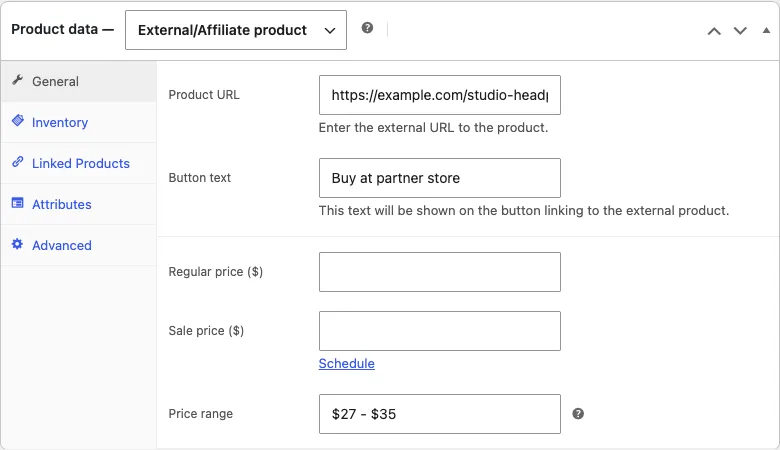
Before, with an empty price field, the product page shows no price at all. The buy button still works because external products don’t require one:
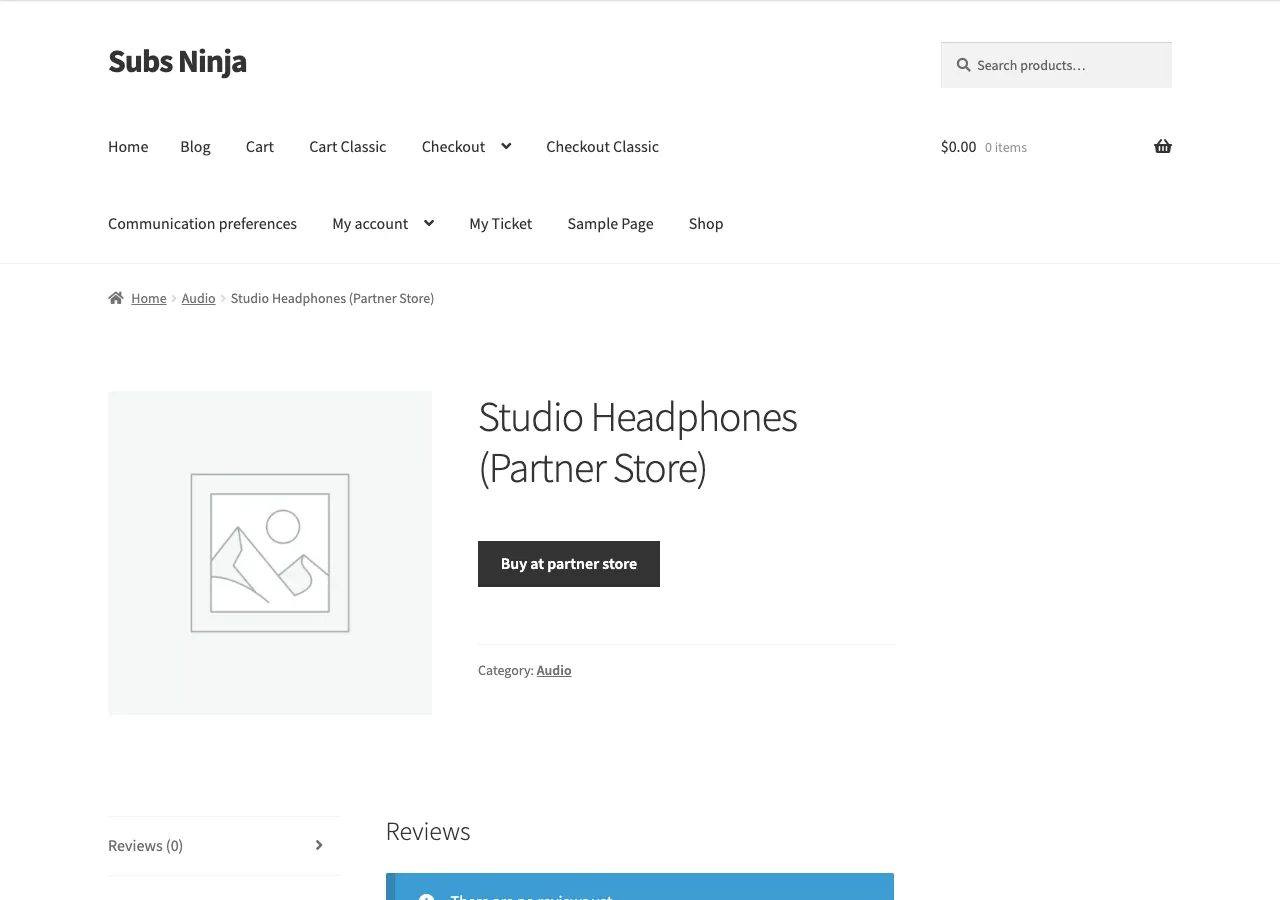
After filling in the field, the range sits exactly where a price normally would:

I tested this on WooCommerce with the Storefront theme and classic product templates.
Where to add it
All three blocks go together in a child theme’s functions.php or a code snippets plugin like WPCode. Leave the Regular price field empty on the product so the range is the only thing shoppers see.
What this doesn’t do
The range is text, not pricing data. WooCommerce can’t sort or filter by it, though an external product with an empty price field never took part in price sorting anyway. Multicurrency plugins won’t convert it either, so if your store switches currencies, the text stays as typed.
Search engines see the same gap. With no real price on the product, the product data sent to them carries no price at all. For a product that hands the sale to another site, those trade-offs are usually fine. Know them before you rely on it, though.
If you sell through external products a lot, the same three hooks stretch past ranges. They can store and print “From $27”, “Price varies by retailer”, or anything else the price field won’t hold.

Shameem Reza Happiness Engineer at Automattic
I fix WooCommerce problems for a living and review plugins for WordPress.org. Every fix here is tested on a clean site first.



No comments yet. Ask the first question.