

On this page
This week, a developer building a tour booking site for their client came to us with a small request. The site runs on WooCommerce Bookings, and some of the tours only happen once a day, always at 10:00.
On those tours, the customer picks a date and a single 10:00 button shows up under the calendar. The Book now button stays grey until they click it. There’s nothing else to choose, but the customer still has to make that extra click. The developer wanted it gone.
Bookings has no setting for this, and that was our first answer, along with a feature request they could vote on. I expected that to be the end of it.
It wasn’t. They came back a few hours later with their own plan. A small jQuery script would watch the time picker with a MutationObserver and click the slot when only one shows up. Before shipping it, they asked one question: does Bookings fire a JS event once the slots finish loading? Hooking into that would be cleaner than watching the DOM.
I didn’t want to answer that from memory, so I opened the Bookings code and tested their idea on my local site before replying.
How Bookings loads the slots
Before looking for an event, I wanted to see the whole path from picking a date to a bookable slot. So I sketched it out.
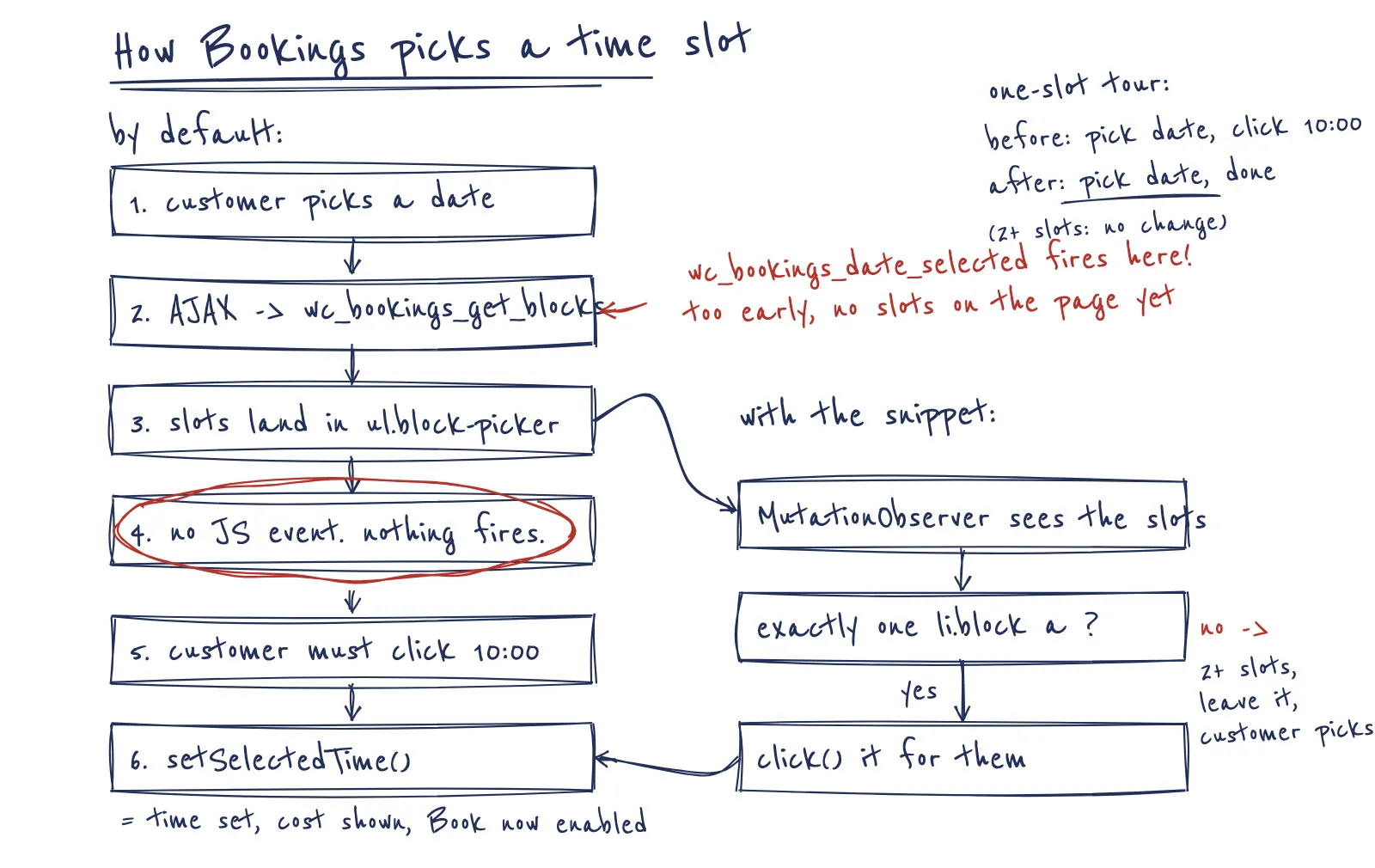
The booking form script is dist/frontend.js inside the plugin. When a date is picked, showAvailableTimeBlocks() sends the wc_bookings_get_blocks AJAX request. When the response comes back, the success callback puts the slot HTML into the list. It also removes slots that fall outside the visitor’s day after timezone conversion, re-selects the slot the customer had picked before if it’s still there, and focuses the first link.
Then it stops. No trigger(), no hook, nothing to listen for.
The hook that looked right
Bookings does have a small JS hooks API on window.wc_bookings.hooks. So I went through every action it fires:
wc_bookings_form_field_change.wc_bookings_pre_calculte_booking_cost(the typo is in the plugin).wc_bookings_date_selected.wc_bookings_date_picker_refreshed.
None of them runs after the slots render.
wc_bookings_date_selected looked like the one, and I got its timing wrong on my first read. I thought it fired before the AJAX request. It fires right after the request goes out, but before the response comes back. Either way, the slots aren’t on the page yet, so a script hooked there would count an empty list.
So their fallback was the right call. Watching the DOM is the only reliable way to know the slots have arrived.
One small thing in their plan
The plan was to click when the picker renders exactly one .block-picker block. But .block-picker is the <ul> itself. Every form has one, whether it holds one slot or twelve, so that check would always pass.
The slots come from get_time_slots_html() in includes/booking-form/class-wc-booking-form.php. For fixed-duration products, each slot is an li.block with a link inside, and the link carries the slot time in data-value:
<ul class="block-picker">
	<li class="block" data-block="1000"><a href="#" role="button" data-value="2026-09-18T10:00:00+0100">10:00 am</a></li>
</ul>
So the thing to count is li.block a, and the thing to click is the link. Bookings listens with $('.block-picker').on('click', 'a', ...), and that handler calls setSelectedTime(). It fills the hidden time input, starts the cost calculation, marks the slot as selected, and enables Book now. Clicking the link reuses all of that. Nothing to copy.
Testing it on a local site
I set up my local site with WooCommerce and Bookings as the only active plugins, on Storefront. WordPress 7.1, WooCommerce 11.1.0, and Bookings 3.10.0.
Then I created two bookable products with a fixed one-hour block. The first one is available from 10:00 to 11:00 every day, so each date has one slot. The second runs from 10:00 to 12:00, so each date has two.
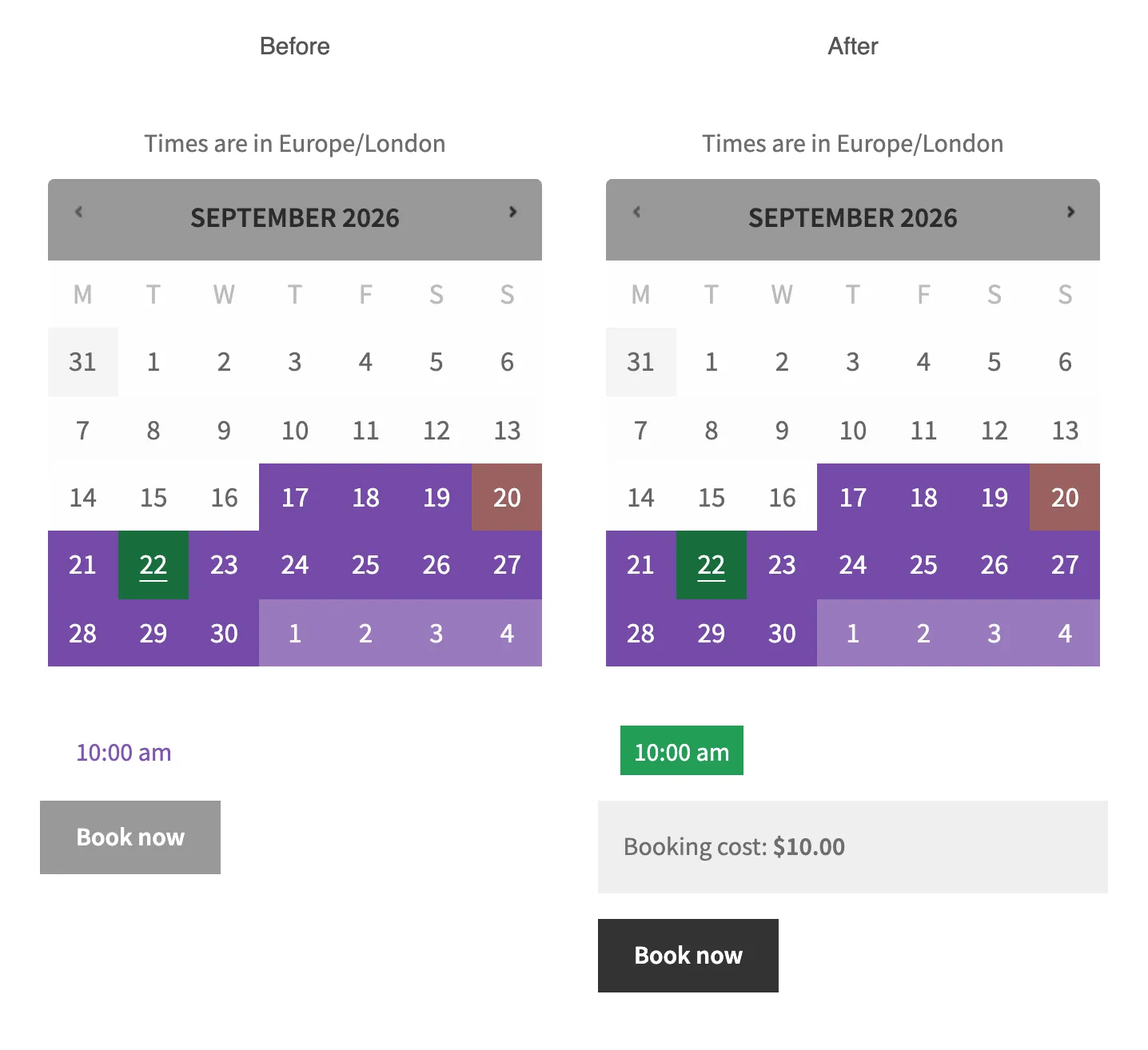
Without the snippet, the one-slot product looked exactly like the screenshot the developer shared. I picked a date, a 10:00 am link showed up unselected, and Book now stayed disabled.
With the snippet, I ran the same steps. The slot was selected as soon as it loaded, the booking cost showed up, and Book now was enabled. Clicking it put the booking in the cart. After changing the date, the new date’s slot was selected too.
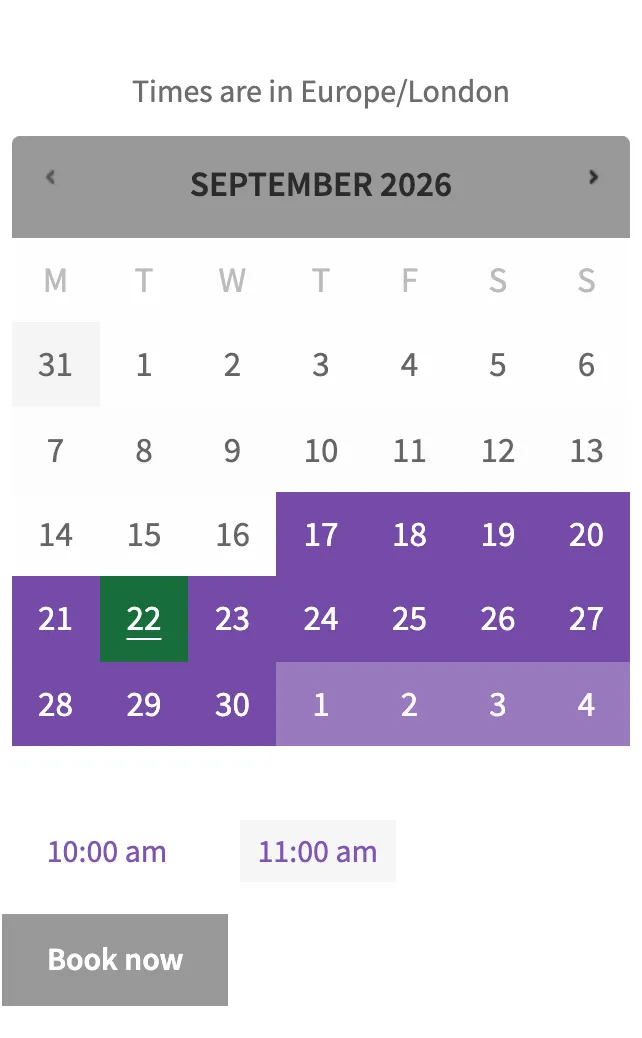
The two-slot product mattered as much as the one-slot one. With the snippet active, nothing was selected, Book now stayed disabled, and the console had no errors. When there’s a real choice, the customer should make it.
The snippet
// Purpose: Auto-select the time slot on WooCommerce Bookings product pages when a date has only one available slot.
// Tested with: WordPress 7.1, WooCommerce 11.1.0, WooCommerce Bookings 3.10.0.
// Note: Covers fixed-duration products using hours or minutes. Customer-defined and month durations are left alone.

/*
 * Bookings loads time slots over AJAX and fires no JS event once they render,
 * so a MutationObserver on the slot list is the only reliable signal.
 *
 * Runs on wp_footer priority 1: the booking form enqueues its script while the
 * product renders, and footer scripts print at priority 20.
 */
add_action(
	'wp_footer',
	function () {
		if ( ! wp_script_is( 'wc-bookings-booking-form', 'enqueued' ) ) {
			return;
		}

		$script = <<<'JS'
( function () {
	function maybeSelectOnlySlot( picker ) {
		var form = picker.closest( 'form' );

		// Month-duration products use the same list for range picking; leave them alone.
		if ( ! form || form.querySelector( '[name="wc_bookings_field_start_date_yearmonth"]' ) ) {
			return;
		}

		var slots = picker.querySelectorAll( 'li.block a[data-value]' );

		if ( 1 === slots.length && ! slots[0].classList.contains( 'selected' ) ) {
			slots[0].click();
		}
	}

	document.querySelectorAll( '.wc-bookings-booking-form .block-picker' ).forEach( function ( picker ) {
		new MutationObserver( function () {
			maybeSelectOnlySlot( picker );
		} ).observe( picker, { childList: true } );
	} );
} )();
JS;

		wp_add_inline_script( 'wc-bookings-booking-form', $script );
	},
	1
);
Where to add the code
Add it to your child theme’s functions.php, or use a plugin like Code Snippets or WPCode. It needs WooCommerce Bookings active. The JS only prints on pages where the booking form script loads, so the rest of the site never sees it.
How it works
The PHP part hooks wp_footer at priority 1 and checks wp_script_is( 'wc-bookings-booking-form', 'enqueued' ). The booking form enqueues that script while the product page renders, and footer scripts print at priority 20. So priority 1 is late enough to see the script, and early enough to attach the JS with wp_add_inline_script().
The JS part puts a MutationObserver on each .block-picker list and watches childList only. Every time Bookings swaps in new slots, the observer runs once, after the whole success callback finishes. By then the timezone removals are done, so the count is final. If there’s one slot link and it isn’t selected yet, it gets clicked.
Watching childList also stops it from looping. Selecting a slot changes classes and aria-pressed on the link, not the list’s children. The click never wakes the observer again.
A few things to know
- Customer-defined durations show start and end time dropdowns instead of links. The snippet finds nothing to click and stays out of the way.
- Month durations use the same
.block-pickerlist to pick a range. The snippet checks for the month field and skips those forms. - I only tested the booking form on the classic product page, not a block-based booking form.
- I only tested Bookings 3.10.0. If you’re on an older version, try it on staging first.
This isn’t the first small Bookings front-end tweak I’ve shared. A while back I wrote about showing Add to Cart instead of Read More for bookable products.
If a future Bookings release adds an event for when slots finish loading, swap the observer for that. Until then, a customer booking a once-a-day tour picks a date and goes straight to Book now.

Shameem Reza Happiness Engineer at Automattic
I fix WooCommerce problems for a living and review plugins for WordPress.org. Every fix here is tested on a clean site first.



No comments yet. Ask the first question.