The problem every WordPress support engineer knows.
You need admin access to a customer’s site. So you ask them to create a temporary user, set a password, share it through a secure link through QuickForget, and delete the account when you’re done.
I was doing this multiple times a day. Some customers handled it fine. Others stopped responding because the ask felt too heavy. First-timers found it intimidating. Tickets would stall for days over a login credential.
The steps weren’t broken. The security wasn’t the issue. It was the friction. Both sides felt it.
I tried a few existing plugins. Some were close. None of them felt built for this kind of support flow. Most give you a login URL and call it done. I needed more control than that.
So I built my own thing. I called it HappyAccess.
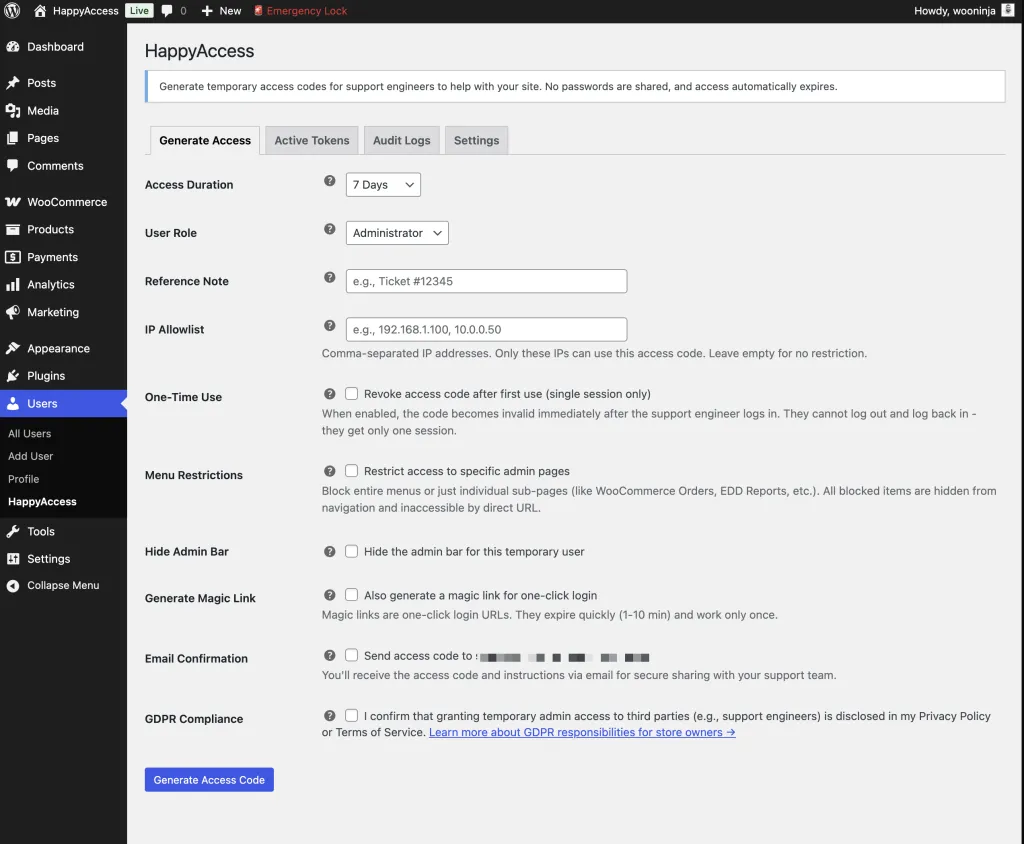
The idea is simple. The site owner generates a 6-digit OTP code and picks how long it stays active. WordPress creates a temporary user tied to that code. When time runs out, the user and all related data get cleaned up automatically. No passwords change hands. No leftover accounts sitting around with admin privileges.
Verizon’s Data Breach Investigations Report found that around half of all data breaches involve compromised credentials. The less passwords move between people, the smaller that surface gets.
That last part matters more than people think. WordPress powers over 43% of all websites. Orphaned admin accounts with stale credentials are a real risk. HappyAccess removes that risk by design.
I added things along the way as they made sense. Magic links for one-click login. Rate limiting on failed attempts. An emergency lock button that revokes everything with one click. Menu restrictions so the temp user only sees what you want them to see. IP allowlisting. reCAPTCHA support. A full audit log with CSV export.
There’s also something I called OTP share links. Instead of using a third-party tool to share the code securely, HappyAccess generates a single-view link. The recipient opens it, sees the code, and the link self-destructs. It replaced an extra step in my workflow.
One-time use codes are there too. When you need maximum security, the code auto-revokes after the first login. One session. That’s it.
The GDPR part mattered to me. There’s a consent checkbox before any code gets generated. Privacy policy integration is built in. Data export and erasure work out of the box. All data stays on the site. Nothing gets sent anywhere unless you turn on reCAPTCHA.
I was also careful about self-protection. Temp users can’t see HappyAccess in the plugin list. They can’t edit or delete the site owner. Bulk actions that could cause damage are blocked. The plugin hides itself from the people it creates access for.
It started as an idea I drafted and shared with my team. People found it useful. So I cleaned it up, followed WordPress coding standards, ran it through PHPCS and PHPStan, and published it on WordPress.org.
It’s free. It’s open source. The code is on GitHub if you want to look at it.
If you work with support engineers, freelancers, or agencies and you’re tired of the password-sharing routine, give it a try. I built it to fix my own problem, but it might fix yours too.
Join the conversation
Have thoughts, questions, or a different take? I'd love to hear from you.
Powered by Giscus · Sign in with GitHub to comment. ·Privacy policy