
On this page
Messy code slows teams down and leads to subtle bugs. When I started shipping plugins, I realized my code wasn’t always WordPress enough. Naming, spacing, escaping, small things, but they add up when your work gets reviewed or handed off to another developer.
That’s where PHPCS (PHP_CodeSniffer) and the WordPress Coding Standards (WPCS) come in. The WordPress Coding Standards (WPCS) give us a shared rulebook, and PHPCS enforces it automatically.
Instead of debating style in pull requests, I let PHPCS enforce the rules. It catches:
- Escaping mistakes.
- Deprecated functions.
- Naming or file structure issues.
- Inconsistent whitespace and braces.
And the best part: most of it can be auto-fixed with phpcbf.
My setup
I run PHPCS two ways: globally (for quick checks) and project-local (so teams get the same rules).
Global install:
composer global require squizlabs/php_codesnifferTo check it works, you can run phpcs -i. You’ll see a list of built-in standards like PSR1, PSR2, PSR12, Squiz.
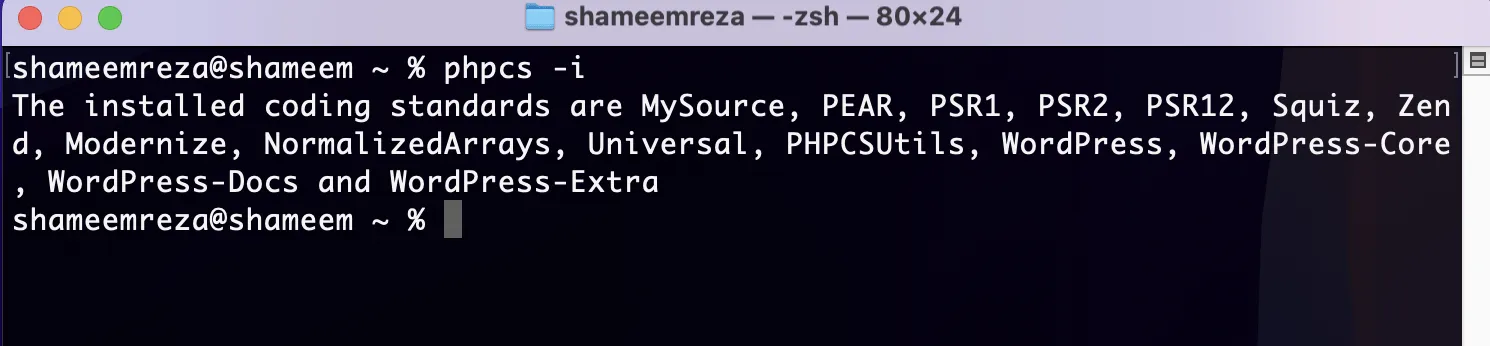
Once PHPCS installed, it’s time to install WordPress coding standard. To install it globally, you can run this:
composer global require wp-coding-standards/wpcsThen tell PHPCS where to find the rules:
phpcs --config-set installed_paths ~/.composer/vendor/wp-coding-standards/wpcsNow phpcs knows about the WordPress rules, and you can check again using phpcs -i. Now you should see WordPress, WordPress-Core, WordPress-Extra, WordPress-Docs.
Per project:
For teams, lock PHPCS and WPCS into your repo, so everyone runs the same version:
composer require --dev squizlabs/php_codesniffer wp-coding-standards/wpcs dealerdirect/phpcodesniffer-composer-installerThis locks versions in your repo, so new devs don’t have to fiddle with configs.
Then I add a .phpcs.xml:
<?xml version="1.0"?>
<ruleset name="WordPress">
  <file>./</file>
  <exclude-pattern>*/vendor/*</exclude-pattern>
  <rule ref="WordPress"/>
  <rule ref="WordPress-Core"/>
  <rule ref="WordPress-Extra"/>
</ruleset>
This checks everything except vendor files. If I need to disable Yoda conditions (I usually do):
<exclude name="WordPress.PHP.YodaConditions.NotYoda"/>You can also tweak properties (like text domains):
<rule ref="WordPress.WP.I18n">


<property name="text_domain" type="array" value="my-plugin"/>
  </properties>
</rule>
Running it
<p>It’s simple, just run:
vendor/bin/phpcsTo auto-fix issues where possible:
vendor/bin/phpcbfThat’s it. PHPCS shows violations, phpcbf fixes what it can.
Editor integration
I use VS Code with the PHP Sniffer & Beautifier extension. You can also use the PHP Sniffer extension too. Point it to vendor/bin, enable format on save, and PHPCS runs silently in the background. No debates in PRs, no nitpicking in code reviews.
In CI
If your project is on GitHub, adding a quick Action means every push runs PHPCS. Example .github/workflows/phpcs.yml:
name: PHPCS
on: [push, pull_request]
jobs:
  lint:
    runs-on: ubuntu-latest
    steps:
      - uses: actions/checkout@v3
      - name: Install Composer deps
        run: composer install --no-progress
      - name: Run PHPCS
        run: vendor/bin/phpcs
Following WPCS isn’t about passing a checklist. It’s about writing code other WordPress devs can read without thinking. PHPCS just automates the boring part.
Once you set this up, you’ll notice how much cleaner your diffs and pull requests look, and how much easier it is to pass reviews on WordPress.org or WooCommerce.com.

Shameem Reza Happiness Engineer at Automattic
I fix WooCommerce problems for a living and review plugins for WordPress.org. Every fix here is tested on a clean site first.


No comments yet. Ask the first question.