
On this page
Earlier today, a store owner reached out with a problem that looked simple on the surface. They were selling fabric swatches with Product Add-ons and had marked the product as sold individually. Customers should only be able to buy one per order since each swatch came with a coupon, and sending multiple coupons would kill their margins.
But that safeguard didn’t work. Shoppers could still add multiple swatches to the cart, just by picking different colors.
The hidden conflict
At first glance, it feels like WooCommerce ignored the sold individually rule. In reality, the issue comes from how WooCommerce identifies products in the cart.
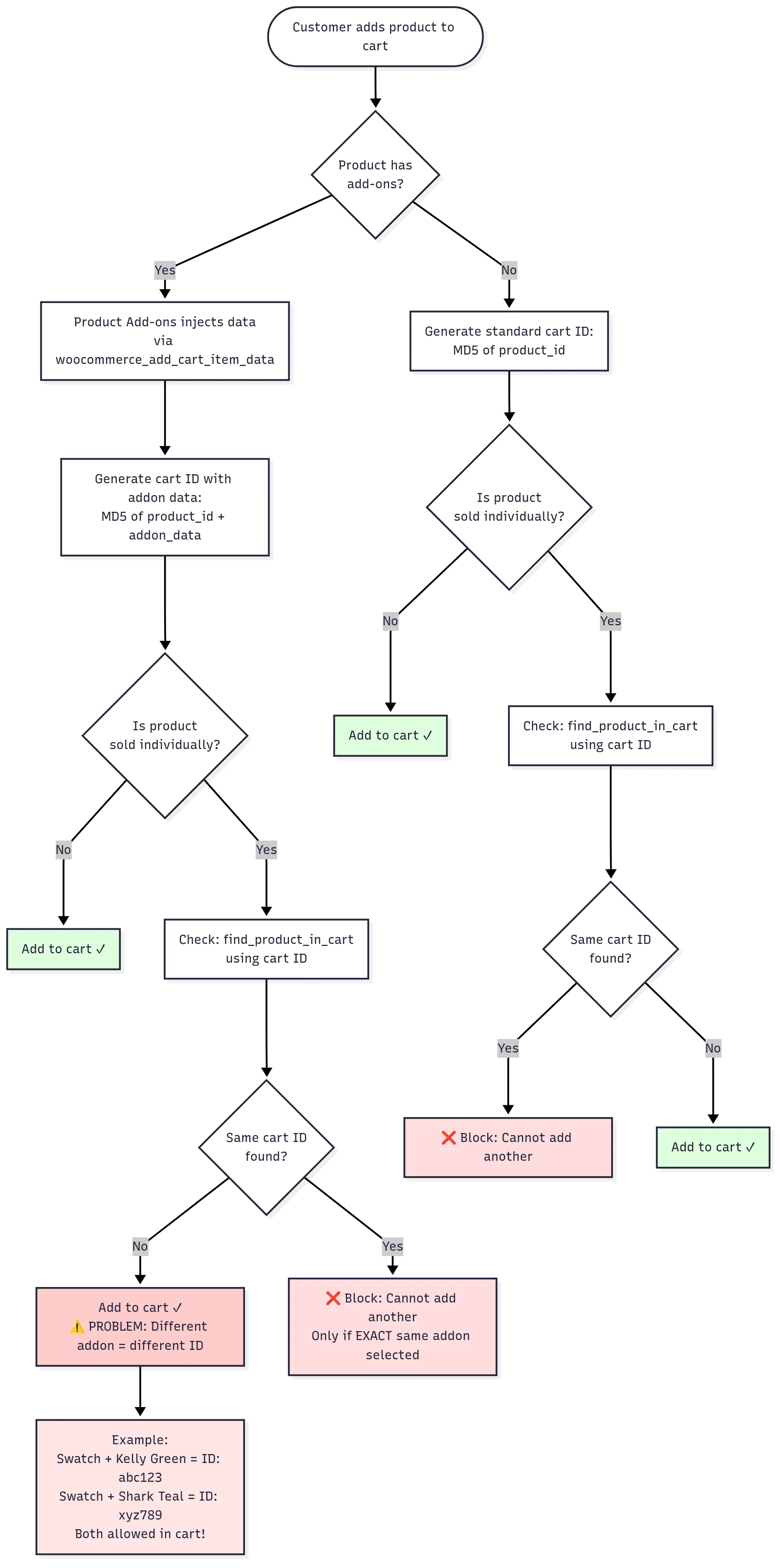
When you add a product to the cart, WooCommerce generates a unique ID based on the product ID, variation data, and any additional cart item data. Product Add-ons injects its data into this mix.
So when a customer adds an add-on, WooCommerce thinks:
Product: Nameplate/Number Swatches
Add-on: Kelly Green
Cart ID: abc123
Then another add-on gets a completely different cart ID:
Product: Nameplate/Number Swatches
Add-on: Shark Teal
Cart ID: xyz789
Since the IDs don’t match, WooCommerce happily allows both. The Sold individually setting technically fires, but because it only checks against matching IDs, it passes.
The solution
After diving through the WooCommerce cart handling code, I found that we need to intercept the validation process before the add-on data creates that unique identifier. Here’s the fix:
/**
 * Fix for Product Add-ons bypassing "Sold individually" setting
 * Add this to theme's functions.php or as a custom plugin
 */
add_filter( 'woocommerce_add_to_cart_validation', 'enforce_sold_individually_with_addons', 999, 5 );

function enforce_sold_individually_with_addons( $passed, $product_id, $quantity, $variation_id = 0, $variations = array() ) {
    // Get the product
    $product = wc_get_product( $variation_id ? $variation_id : $product_id );

    // Only check if product is sold individually
    if ( ! $product || ! $product->is_sold_individually() ) {
        return $passed;
    }

    // Check if this product is already in cart (ignoring add-on variations)
    foreach ( WC()->cart->get_cart() as $cart_item ) {
        if ( $cart_item['product_id'] === $product_id ) {
            // If it's a variable product, also check variation
            if ( $variation_id && isset( $cart_item['variation_id'] ) && $cart_item['variation_id'] !== $variation_id ) {
                continue;
            }

            wc_add_notice(
                sprintf(
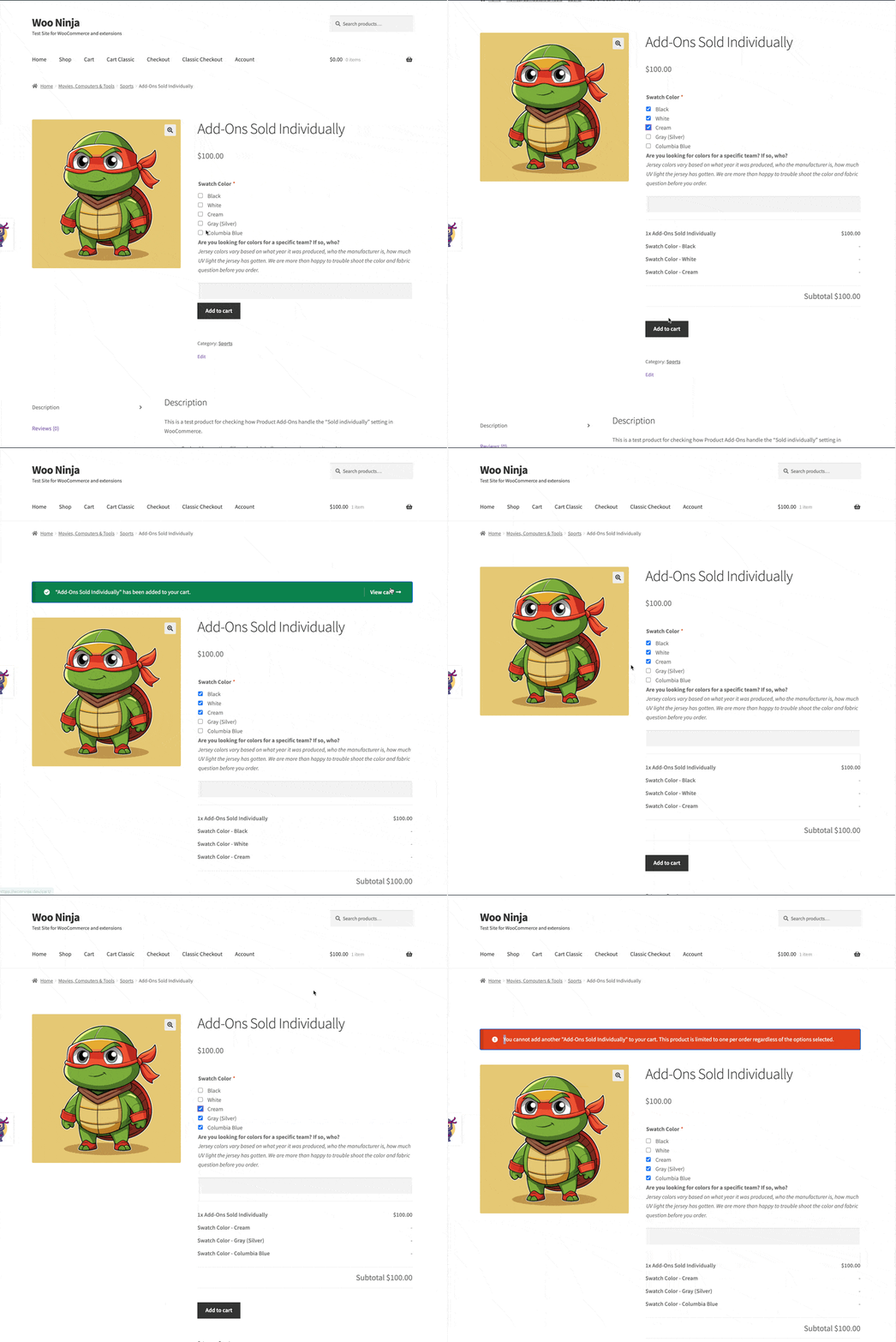
                    __( 'You cannot add another "%s" to your cart. This product is limited to one per order regardless of the options selected.' ),
                    $product->get_name()
                ),
                'error'
            );
            return false;
        }
    }

    return $passed;
}
Where to add this code
You have three options:
- Theme’s functions.php: Quick, but gets lost during theme updates unless you are using a child theme.
- Custom plugin: Create a simple plugin file and activate it.
- Code snippets plugin: Use a plugin like Code Snippets for easy management
How it works
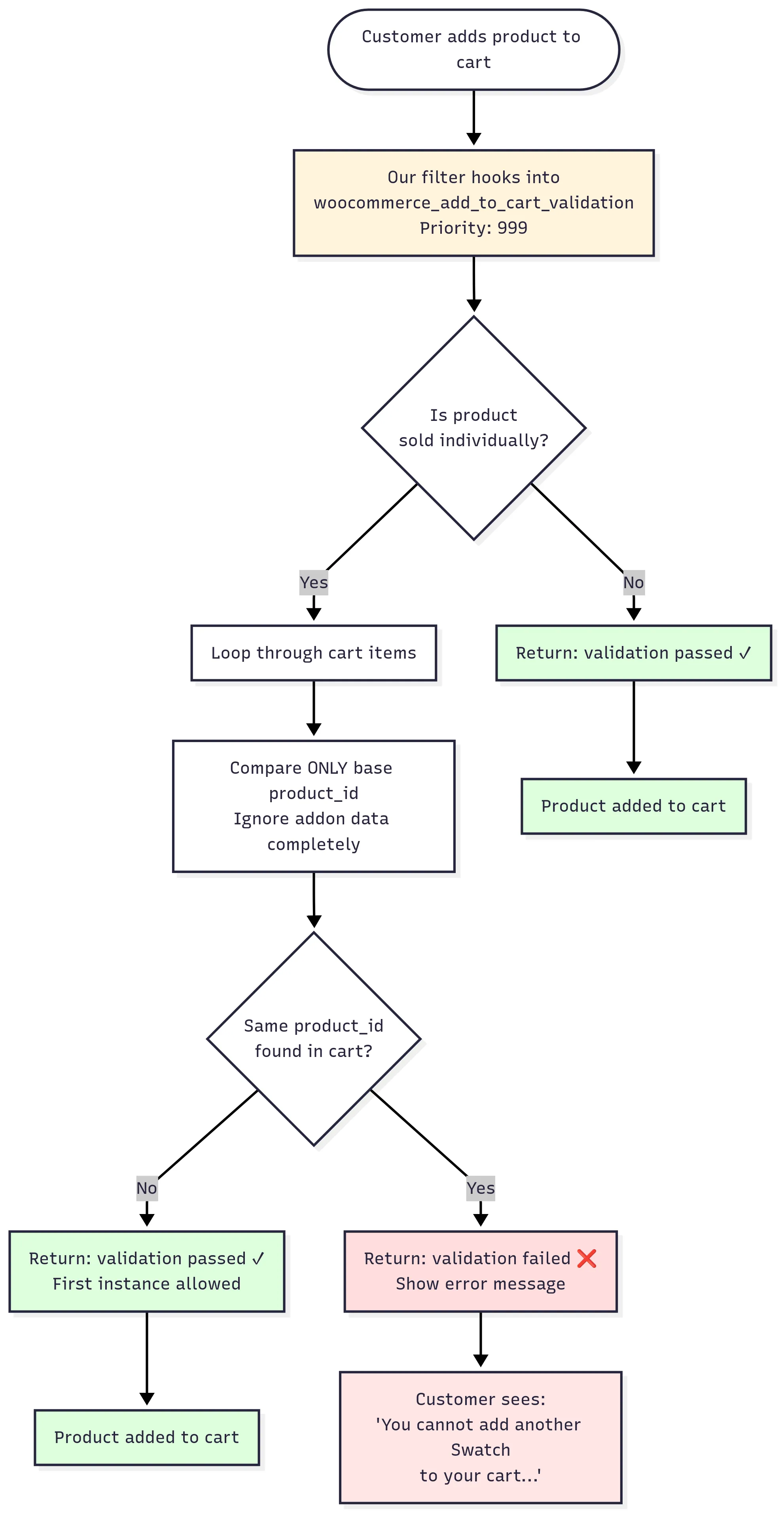
The code hooks into woocommerce_add_to_cart_validation with a high priority (999) to run after Product Add-ons has done its processing. It then:
- Checks if the product has sold individually enabled.
- Loops through the existing cart items.
- Compares only the base product ID, ignoring add-on data.
- Blocks the addition if the same product is found.
- Shows a clear error message to the customer.
What this doesn’t change
This solution specifically targets the sold individually setting with Product Add-ons. It won’t affect:
- Products without the sold individually setting.
- Regular variable products without add-ons.
- Other quantity restrictions you might have in place.
- The normal Product Add-ons functionality.
Alternative approaches
If you need more flexibility, consider these alternatives:
- Variable products: Convert your add-on options to product variations. This respects sold individually natively but requires restructuring your products.
- Custom quantity rules: If you need to allow multiple options but limit total quantity, you could modify the code to count all instances and enforce a maximum.
- Separate products: Create individual products for each option instead of using add-ons. More work to set up but gives you complete control.
The funny thing about WooCommerce is that most of the time, nothing’s actually broken. Product Add-ons is doing its job. Sold individually is doing its job. They just don’t talk to each other the way you’d expect.
That’s where small snippets like this come in. They act as a bridge, closing the gap between two features that were never designed to meet.
If you run a store that uses coupons, samples, or one-off items, this kind of tweak can save you a lot of headaches. And if you’ve hit similar conflicts in your setup, I’d love to hear about them. Sometimes the best solutions don’t come from code, but from how other store owners approach the same problem.

Shameem Reza Happiness Engineer at Automattic
I fix WooCommerce problems for a living and review plugins for WordPress.org. Every fix here is tested on a clean site first.



No comments yet. Ask the first question.