

On this page
Largest Contentful Paint is the Core Web Vitals metric that measures how long it takes for the largest visible element in the viewport to render. Until the LCP element paints, the page looks half-broken. In practice, it’s usually the hero image, a large heading, or a video poster frame.
Google wants the LCP under 2.5 seconds for a “good” rating. LCP is weighted at 25% of the PageSpeed performance score, and it feeds directly into the Core Web Vitals signal for Search. If one number moves your speed score and your SEO at the same time, it’s this one.
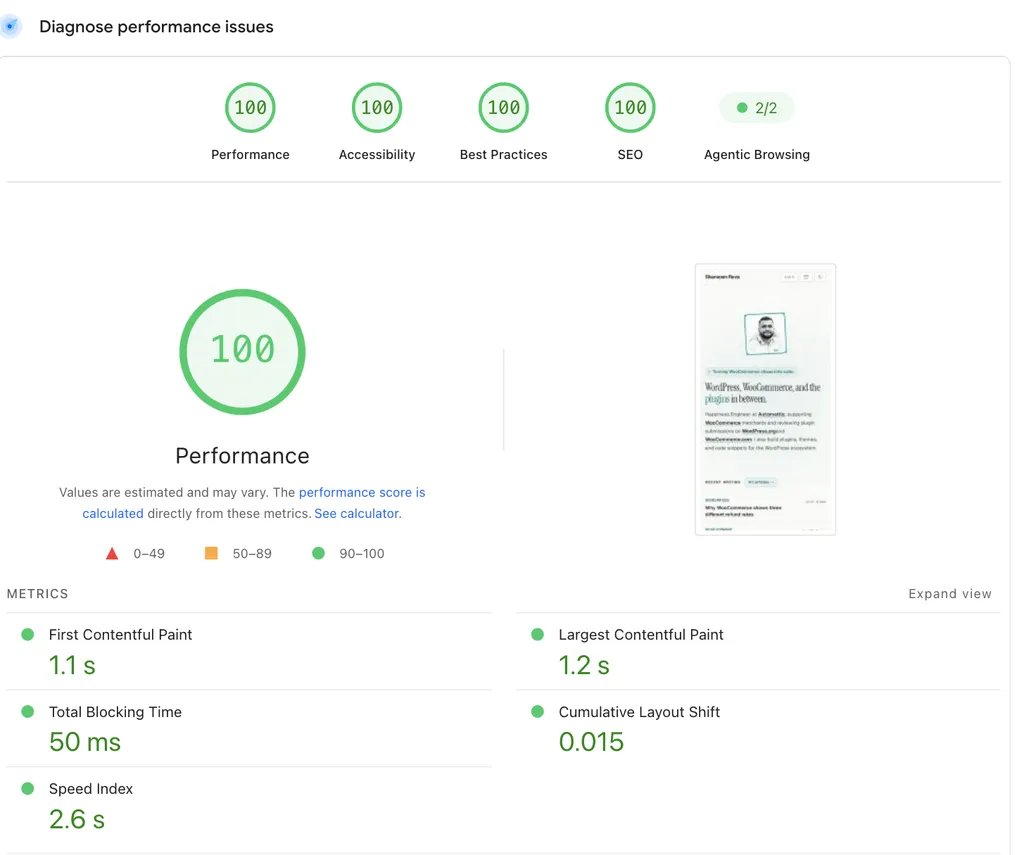
Here’s this site’s PageSpeed Insights report from July 2026, mobile test. LCP sits at 1.2 seconds:
Find out where your LCP time actually goes
Before you fix anything, run the page through PageSpeed Insights and open the “LCP breakdown” insight in the report. It splits your LCP into four subparts: time to first byte, resource load delay, resource load duration, and element render delay. Each subpart points at a different fix, so this one panel tells you where to spend your effort before you touch anything.
It also shows which element is the LCP element, and that alone can save you from optimizing the wrong thing. On this site’s homepage, the LCP element isn’t an image at all. It’s the bio paragraph:
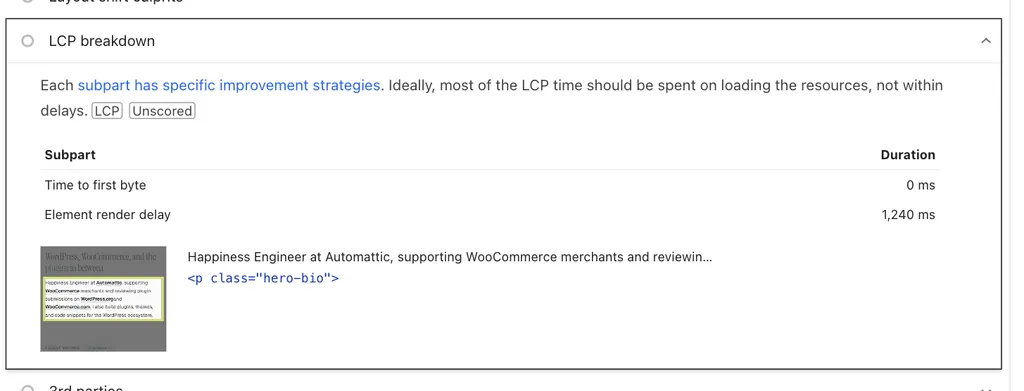
All 1.2 seconds here is element render delay, which for a text element mostly means font loading and render-blocking CSS. If I’d assumed the LCP element was the profile photo and spent an afternoon compressing it, nothing would have changed.
What causes a slow LCP
Once you know your LCP element and which subpart is eating the time, the usual suspects are:
- Slow server response time. The browser can’t render anything until the HTML arrives. If TTFB is bad, LCP can’t be good.
- Render-blocking JavaScript and CSS. Every synchronous script or external stylesheet in the
<head>delays first paint. The more plugins and the heavier the theme, the worse this gets. - Large hero assets. A 3 MB PNG as the LCP element is the most common cause I see on WordPress sites. Resize, compress, and serve it at the dimensions you’re actually using.
- Client-side rendering. If your hero is rendered by JavaScript after hydration, the browser has to download and parse JS before anything paints. Server-rendered HTML almost always gives you a better LCP.
The two fixes that actually move the number
Move to a host that prioritises performance
LCP is a measure of how fast content arrives. Everything after TTFB compounds on top of TTFB. If your host is slow, you can optimise the page for a week and barely move the number.
If you’re on WordPress, I work at Automattic, so my go-tos are WordPress.com for most sites and Pressable when you need SFTP, SSH, staging, or you’re managing client sites at scale. Both run on WP Cloud with global caching baked in. Shared hosting is almost always where poor LCP starts.
Optimize the LCP image
If the LCP breakdown insight shows an image as your LCP element, that’s the one file you need to fix first. The “LCP request discovery” insight in the same report tells you whether the browser found the image early or had to wait for CSS or JavaScript to reveal it.
- Serve it in WebP or AVIF if you can. Both cut file size by 30 to 60% compared to PNG at the same quality.
- Resize it to the dimensions actually displayed. A hero image rendered at 1200 pixels wide doesn’t need a 4000-pixel-wide source.
- Add
fetchpriority="high"on the<img>tag so the browser prioritises it over other resources. - If it’s a custom field image in a theme template, preload it with
<link rel="preload" as="image" href="...">in the<head>.
The combination of a correctly-sized WebP plus fetchpriority="high" is usually the single biggest LCP improvement on a content-heavy WordPress site.
Second-order fixes
These matter, but they move the number less than the two above. Do them after the host and the hero image are sorted.
Use a CDN
A CDN caches your static assets at edge locations close to your visitors. For a visitor in Madrid, a file served from Frankfurt is dramatically faster than the same file served from your origin in Virginia.
I use BunnyCDN for most projects. It’s cheap and fast. Cloudflare’s free tier works too if you want a zero-cost option. Both WordPress.com and Pressable include a CDN by default, so you usually don’t need to configure one separately if you’re on WP Cloud.
Cache aggressively
If your host doesn’t already cache HTML at the edge, use a caching plugin like WP Rocket. If it does (WP Cloud, Kinsta, Cloudways), don’t add a caching plugin on top, you’ll fight with the host’s cache and create weird invalidation bugs.
Service workers for returning visitors
A service worker can serve the cached HTML instantly on a repeat visit while it revalidates in the background. LCP drops to near-zero on second page views. This is a real win for content sites, but it’s complex to set up correctly, and it’s only worth the effort after the host and hero image are fixed.
Reduce render-blocking JS and CSS
Open DevTools, go to the Coverage tab, and look at how much of your CSS and JS is unused on the first page view. For most WordPress themes, it’s 60 to 80%. You don’t need to get to zero, you just need the critical path to be fast.
The two biggest wins here are:
deferorasyncevery script that isn’t needed before first paint.- Inline the critical CSS for the above-the-fold content and load the rest asynchronously.
Plugins like WP Rocket, FlyingPress, and Perfmatters automate both of these. Do them after you’ve squeezed the image wins, not before.
Compress everything else
Enable Brotli or gzip on the server for HTML, CSS, and JS. Minify JS and CSS at build time. These are one-time changes that compound over every request but don’t solve anything on their own.
The priority order, one more time
If you remember one thing from this post:
- Fast host.
- Optimized LCP image with
fetchpriority="high"and preload. - Everything else.
A slow host with a 3 MB PNG as the LCP element will still score poorly no matter how aggressively you minify your JavaScript. Get the first two right before you spend an afternoon on the third.

Shameem Reza Happiness Engineer at Automattic
I fix WooCommerce problems for a living and review plugins for WordPress.org. Every fix here is tested on a clean site first.



No comments yet. Ask the first question.