

On this page
The first time I tried to roll back a product change in WooCommerce, I assumed revisions would be there.
They weren’t.
That surprised me, because WordPress supports revisions almost everywhere. Posts, pages, and even some custom post types. But products? Not by default.
After running into this a few times while helping merchants, I now enable product revisions almost immediately on stores where product data changes often.
This post is how I do it, and why it’s worth enabling.
Why product revisions actually matter
Product data changes more often than we think.
Prices get adjusted. Descriptions get rewritten. Short descriptions disappear by accident, or even someone hits update too fast.
When revisions are enabled, you have a safety net. You can see what changed, when it changed, and roll back if needed.
This becomes especially useful when:
- more than one person edits products.
- content is updated frequently.
- you want confidence before experimenting.
I’ve seen revisions save hours of rework more than once.
The small thing WooCommerce doesn’t enable by default
WooCommerce products are a custom post type. WordPress supports revisions for custom post types, but WooCommerce doesn’t turn them on for products out of the box.
The good news is enabling them is simple.
You don’t need a plugin. You don’t need to touch WooCommerce core files.
You just need to tell WooCommerce that products should support revisions.
How do I enable product revisions in WooCommerce?
You can do this in two ways.
-
by adding code to your child theme’s functions.php
-
or by using a code snippet plugin, like SnipDrop.
If you’re not comfortable editing theme files, a snippet plugin is the safer option.
Here’s the code I use.
add_filter( 'woocommerce_register_post_type_product', 'wc_modify_product_post_type' );

function wc_modify_product_post_type( $args ) {
     $args['supports'][] = 'revisions';

     return $args;
}
Once this is saved, product revisions are enabled immediately.
No extra settings. No reload needed.
Where will you see the revisions?
After enabling this, open any product in the admin.
On the right side, you’ll see the Revisions panel, just like you do for posts and pages. You can compare changes and restore older versions whenever needed.
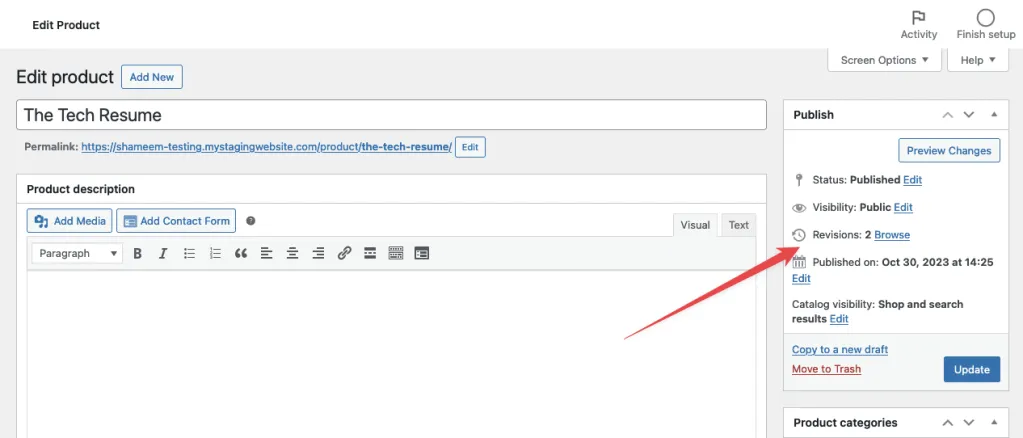
That’s it. WooCommerce products now behave like proper WordPress content.
When do I always enable product revisions?
I enable revisions by default when:
- multiple people manage products
- product descriptions are edited often
- merchants want a safety net
If it’s a small store with one product and no changes, it may not matter. But on growing stores, this is one of those small tweaks that quietly pays off.
Final thoughts
WooCommerce is powerful, but sometimes it hides useful WordPress features behind small defaults like this.
Enabling product revisions doesn’t change how your store works. It just gives you confidence when editing.
And once you’ve needed it once, you’ll probably never want to run a store without it.

Shameem Reza Happiness Engineer at Automattic
I fix WooCommerce problems for a living and review plugins for WordPress.org. Every fix here is tested on a clean site first.


No comments yet. Ask the first question.