
By default, WooCommerce doesn’t display a product’s Global ID, such as GTIN, UPC, EAN, or ISBN in the order details view or the quick preview modal. You’ll see product names and SKUs, but the Global ID remains hidden.
This has been a common feature request, as many merchants rely on Global IDs for product syncing and third-party integrations. While WooCommerce doesn’t offer it out of the box, you can add the functionality with a simple custom snippet.
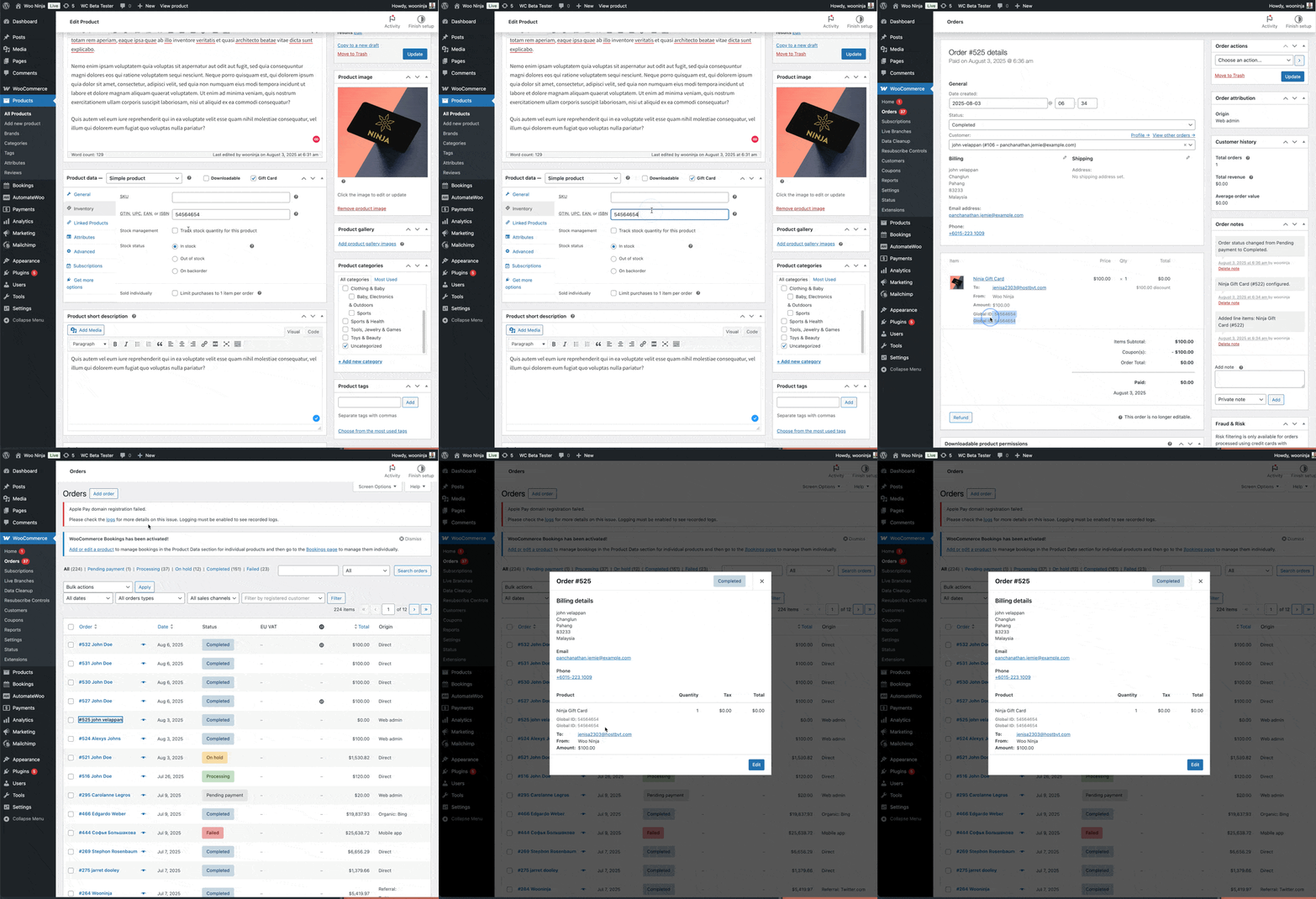
If your workflow depends on Global IDs, showing them directly in the order screen can save time and reduce errors. The snippet below will show them in both the full order details page and the quick preview.
Here’s a simple snippet to make that change:
// Display Global ID in regular order view
add_action( 'woocommerce_after_order_itemmeta', function( $item_id, $item, $order ) {
    if ( is_admin() && $item->is_type( 'line_item' ) ) {
        $product = $item->get_product();
        if ( $product && method_exists( $product, 'get_global_unique_id' ) ) {
            $unique_id = $product->get_global_unique_id();
            if ( $unique_id ) {
                echo '**Global ID:** ' . esc_html( $unique_id ) . '';
            }
        }
    }
}, 10, 3 );

// Filter the order preview HTML to add Global ID after SKU
add_filter( 'woocommerce_admin_order_preview_get_order_details', function( $order_details, $order ) {
    // Get order items
    $line_items = $order->get_items();

    // Create a map of product IDs to Global IDs
    $global_ids = [];
    foreach ( $line_items as $item ) {
        $product = $item->get_product();
        if ( $product && method_exists( $product, 'get_global_unique_id' ) ) {
            $unique_id = $product->get_global_unique_id();
            if ( $unique_id ) {
                $global_ids[$product->get_id()] = $unique_id;
            }
        }
    }

    // Only proceed if we found any Global IDs
    if ( !empty( $global_ids ) ) {
        // Modify the HTML to add Global IDs after SKUs
        $html = $order_details['item_html'];

        // For each product with a Global ID
        foreach ( $global_ids as $product_id => $global_id ) {
            // Find the SKU div for this product and add Global ID after it
            $sku_div = '';
            $global_id_div = '**Global ID:** ' . esc_html( $global_id ) . '';

            // Only replace the first occurrence after the product's SKU
            $pos = strpos($html, $sku_div);
            if ($pos !== false) {
                // Find the end of the SKU div
                $end_pos = strpos($html, '', $pos);
                if ($end_pos !== false) {
                    // Insert our Global ID div after the SKU div
                    $html = substr_replace($html, '' . $global_id_div, $end_pos, 6);
                }
            }
        }

        // Update the item HTML in the order details
        $order_details['item_html'] = $html;
    }

    return $order_details;
}, 10, 2 );
How this works
The snippet uses two hooks:
woocommerce_after_order_itemmeta→ adds the Global ID under each line item on the full order details page.woocommerce_admin_order_preview_get_order_details→ modifies the HTML for the order quick preview, so Global IDs show up right after the SKU.
The output is styled with a light gray font and smaller size to keep it subtle but visible.
Where to add the code
You can safely add this to:
- Your child theme’s functions.php file.
- Or manage it via a plugin like Code Snippets.
What to expect
After adding this snippet:
- Every line item in the admin order details page will display its Global ID.
- The quick order preview will also show Global IDs directly under SKUs.
- Customers won’t see these IDs on the front end, they remain for admin use only.
This small tweak is useful if you’re working with external systems, product syncing, or simply want clearer identifiers when viewing orders in WooCommerce.
Have you tried exposing other hidden product fields in your admin order view? Share your thoughts in the comments.

Shameem Reza Happiness Engineer at Automattic
I fix WooCommerce problems for a living and review plugins for WordPress.org. Every fix here is tested on a clean site first.



No comments yet. Ask the first question.