
On this page
There are times when the WooCommerce cart page just gets in the way.
If you’re selling a single product, a service, or a fixed package, forcing customers through the cart can feel unnecessary. One extra step. One extra decision. One more chance to drop off.
I’ve had to solve this exact problem more than once, so in this post I’ll share how I skip the cart and redirect customers straight to the checkout page in WooCommerce, based on what actually worked for me.
No plugins. No hacks. Just clean WooCommerce behavior.
When skipping the cart actually make sense?
This setup works best when:
- You sell one product or one package at a time.
- Customers don’t need to compare multiple items.
- You want faster checkout and fewer clicks.
A few days ago, I helped a merchant where customers could buy different services directly from a landing page. There were no product pages. Just buttons.
In that case, the cart page served no purpose. The goal was simple. Click the button. Pay. Done.
Using an add-to-cart URL to jump straight to checkout
The simplest approach is using WooCommerce’s built-in add-to-cart URL.
Here’s the pattern:
/checkout/?add-to-cart=PRODUCT_IDYou can use this URL on buttons, links, or call-to-action sections.
When clicked, WooCommerce adds the product to the cart and loads the checkout page immediately.
This works great when:
- You know the product ID.
- The product doesn’t require extra options.
- You control where the button lives.
For many service-based sites, this alone is enough.
Forcing WooCommerce to always skip the cart
Sometimes, you don’t control every add-to-cart button. Product loops, archive pages, or theme templates can get in the way.
I actually ran into this while helping a merchant. The store was selling a very small set of fixed packages, and almost every customer bought just one item at a time. From the merchant’s point of view, the cart page wasn’t helping anyone. It was just an extra stop before payment.
In cases like that, sending customers straight to checkout made the flow feel faster and more intentional.
I shared this code to add to their child theme’s functions.php.
add_filter('woocommerce_add_to_cart_redirect', 'wooninja_skip_cart_redirect_to_checkout_page');
function wooninja_skip_cart_redirect_to_checkout_page() {
 global $woocommerce;
	$checkout_url = wc_get_checkout_url();
		return $checkout_url;
}
That’s it.
Every add-to-cart action now sends customers straight to checkout.
Quick note if you don’t like touching code
I personally use my own plugin, SnipDrop, for setups like this.
SnipDrop is a code snippet manager, but the part I actually rely on is its curated snippet library. This exact skip cart and redirect to checkout code is already included there.
Instead of copying code into functions.php, you can just enable the snippet, and you’re done.
I built it mainly for situations like this, where the solution is simple, proven, and shouldn’t require manual copy-pasting every time.
The setting you must enable (this part matters)
This is the step most people miss.
For the redirect to work correctly, WooCommerce needs to think it should redirect after adding to cart.
- Go to: WooCommerce → Settings → Products.
- Enable this option: Redirect to the cart page after successful addition
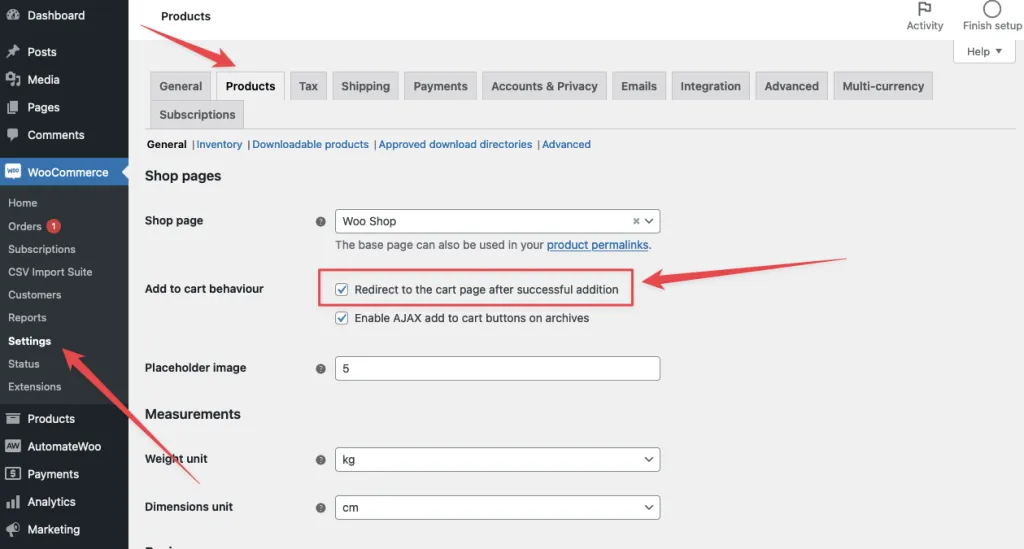
Even though it says cart, this setting is what triggers the redirect filter you added earlier.
Once it’s enabled, WooCommerce hands control to your code, and your redirect to checkout works as expected.
Without this setting, the redirect won’t fire consistently.
A quick note on UX
Skipping the cart can improve conversions, but only when it fits the business model.
If users need to:
- compare items
- adjust quantities
- review bundles
then the cart still has value.
I use this pattern only when the buying decision is already made.
Final thoughts
WooCommerce is flexible, but sometimes it needs a small nudge.
Skipping the cart and redirecting to checkout can remove friction, speed up purchases, and make service-based stores feel more intentional.
The key is understanding when to use it and keeping the solution simple.
If you’re building a focused checkout flow, this approach works quietly and reliably.

Shameem Reza Happiness Engineer at Automattic
I fix WooCommerce problems for a living and review plugins for WordPress.org. Every fix here is tested on a clean site first.
No comments yet. Ask the first question.