
On this page
- What sets the first renewal date at sign-up?
- How does Subscriptions pick the next date after a renewal?
- Why did a late payment move the renewal date?
- Why does a subscription from the 30th renew on the 31st?
- What do early renewal, manual renewal and Process renewal do?
- What happens when you edit the next payment date?
- Which time zone are these dates in?
- How I’d check a renewal date that looks wrong
Earlier this month a teammate asked in our support Slack about one renewal date: a subscription every 4 weeks, aligned to Saturday, that renewed two days after sign-up. I traced it and wrote that one up.
But it bugged me that I’d only answered one date. Store owners ask about the others too. Why is the next payment on the 31st? Why did it move three days after a failed payment?
So I went back to my test store and put four checkouts through in the same minute: a $20 monthly box, $40 coffee every 4 weeks aligned to Saturday, a $15 monthly plan with a 14-day free trial, and a $30 monthly box aligned to the 1st.
The store’s clock said 15:10 on Friday, October 30. I got four different first renewal dates: November 30, October 31, November 13 and November 1.
None of them is wrong. Each date comes from a specific function in WooCommerce Subscriptions 9.3.0, and once you know which one ran, you can predict the date before a customer asks about it. This post covers all of it: the first renewal, every renewal after it, late and failed payments, early and manual renewals, admin edits, and time zones.
What sets the first renewal date at sign-up?
The cart does. WC_Subscriptions_Cart::calculate_subscription_totals() in includes/core/class-wc-subscriptions-cart.php asks WC_Subscriptions_Product::get_first_renewal_payment_date() for a date, starting from the moment of checkout in UTC (line 362). At checkout, WC_Subscriptions_Checkout::create_subscription() saves that date on the new subscription as its next payment. So the date the customer sees next to the recurring total is the date the subscription gets.
The math lives in get_first_renewal_payment_time() in includes/core/class-wc-subscriptions-product.php (line 807). Without a free trial, it adds the billing interval and period to the sign-up time.
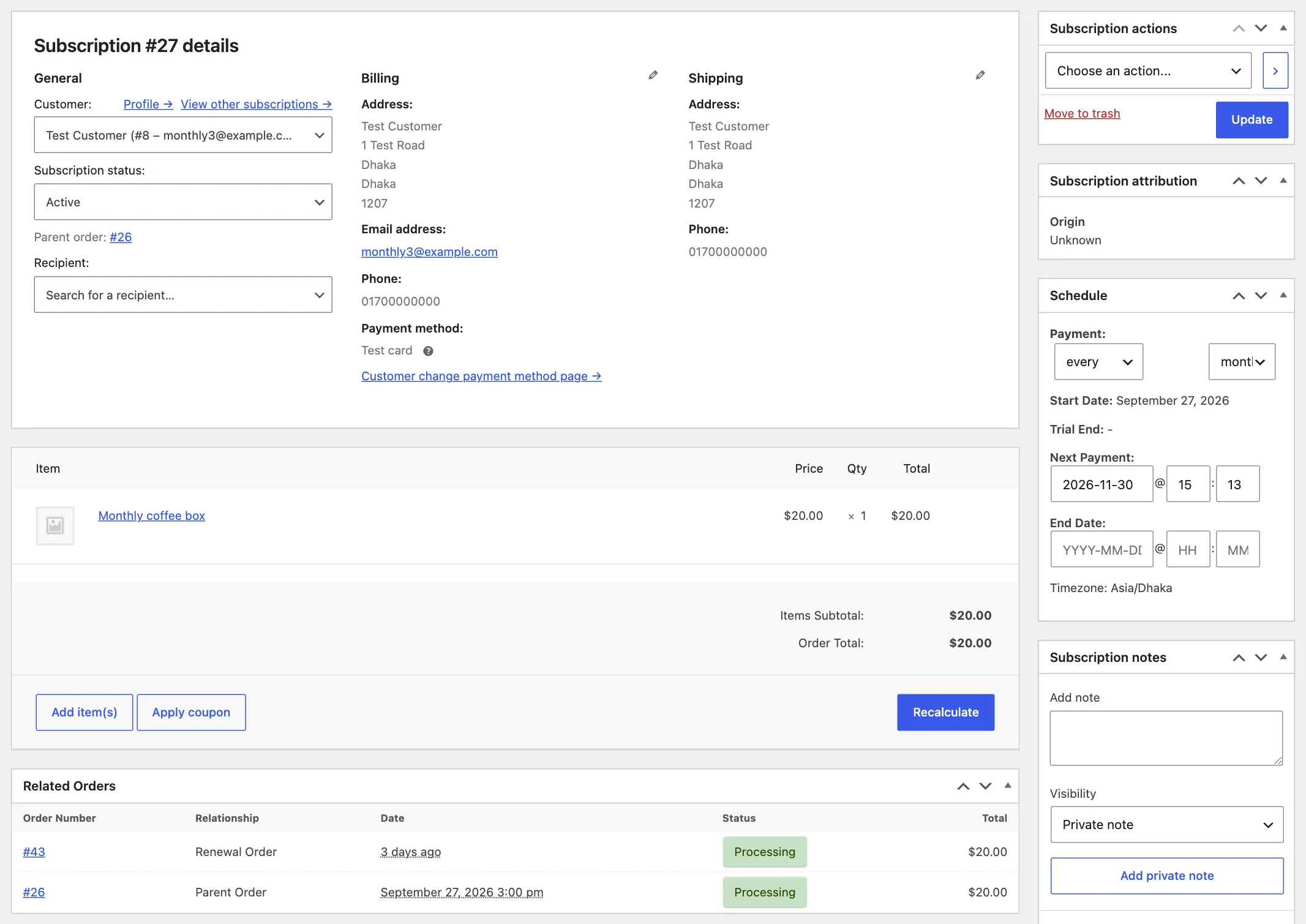
My test store was set to Dhaka time, UTC+6. The monthly box was bought at 15:10 site time on October 30, so it renews at 15:10 on November 30. The time of day carries over too.
With a free trial, the first renewal is the end of the trial, and nothing is added on top. The trial plan, bought at the same minute, ends its trial and renews on November 13 at 15:10. The sign-up fee plays no part in either case. It changes what the customer pays today, not when they pay next.
One more case: if the subscription length equals the billing interval, like 1 month that stops after 1 month, the function returns 0 and there is no renewal at all.
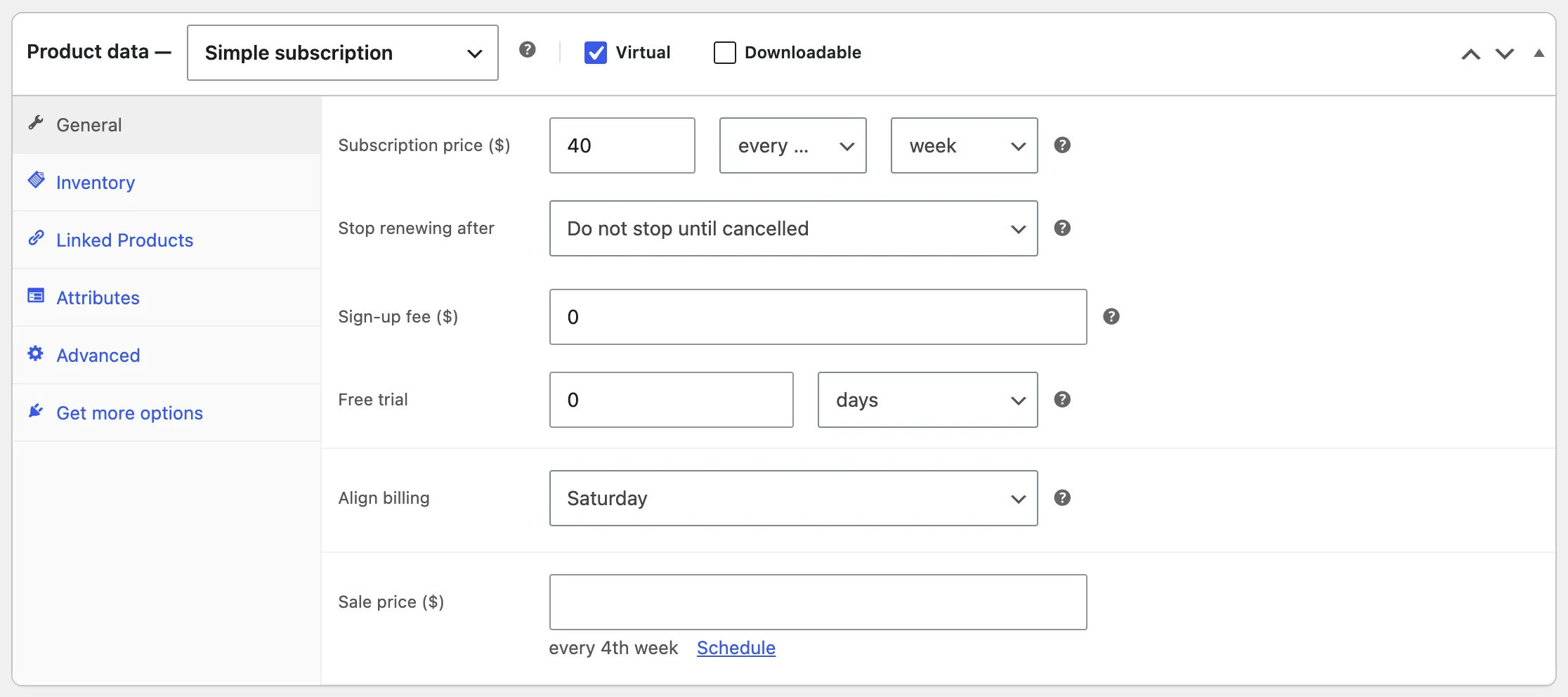
Aligned products
Turning on Align billing changes the answer. The synchroniser hooks into the product’s first renewal time with products_first_renewal_payment_time() in includes/core/class-wc-subscriptions-synchroniser.php (line 1161) and swaps in calculate_first_payment_date() (line 869).
That function starts from the sign-up time, or from the end of the trial if there is one. Then it looks for the next aligned weekday, day of the month, or day of the year in the site’s time zone, and sets the time to 3am (line 1023). The billing date alignment guide says the same thing about 3am.
That’s why my 4-week Saturday product renews on Saturday, October 31, the day after a Friday sign-up. And it’s why the box aligned to the 1st renews on November 1, two days after sign-up. Both charged the full price at checkout, because First billing behavior was on its default, Charge full amount at sign-up.
That setting, under WooCommerce > Settings > Subscriptions > Billing date alignment, decides what the customer pays at sign-up. It also decides how the interval is counted.
At line 906, calculate_first_payment_date() only uses the product’s real interval under Charge full amount at sign-up. Under Charge on the next billing date or Prorate until the next billing date, it counts every product as an interval of 1. For multi-week products that rule has its own catch, which is the whole story of the aligned 4-week post.
A few smaller rules sit in the same file:
- If the aligned day is today,
is_today()(line 1168) makes Subscriptions drop the aligned date and use the normal one, the sign-up time plus the interval. The customer pays the full price at sign-up. - The Sign-up cutoff window setting only shows, and only counts, under Charge full amount at sign-up. A customer who signs up within that many days of the aligned date isn’t charged until that date.
- For monthly alignment, any day above 27 means the last day of the month (line 949).
How does Subscriptions pick the next date after a renewal?
When a renewal is due, Action Scheduler runs woocommerce_scheduled_subscription_payment. WC_Subscriptions_Manager::process_renewal() in includes/core/class-wc-subscriptions-manager.php (line 138) puts the subscription on hold and creates a renewal order. The gateway charges that order. When it’s paid, the subscription goes back to active, and WC_Subscription::update_status() recalculates the next payment date (line 562 of includes/core/class-wc-subscription.php).
The calculation is calculate_next_payment_date() on line 1761 of the same file. It picks a base date, adds one billing interval with wcs_add_time(), and keeps adding intervals until the result is at least two hours in the future. If the subscription has an end date and the next payment would land after it, there is no next payment.
The base date is the part that matters:
graph TD
    A[Renewal order paid] --> B{Free trial still running?}
    B -->|Yes| C[Base: trial end date]
    B -->|No| D{Scheduled date has passed and the subscription is aligned?}
    D -->|Yes| E[Base: the scheduled next payment date]
    D -->|No| F[Base: last renewal order date, created or paid, whichever is later]
    E --> G[Add one billing interval, repeat until at least 2 hours ahead]
    F --> G
    C --> G
The diagram leaves out a few rare branches, like a subscription whose last order is older than its start date. For almost every subscription, the base is the last renewal order. Line 1768 takes the later of the last order’s created date and paid date, and line 1784 uses it as the base.
I tested the on-time case first. A monthly subscription was due at 15:00 site time on October 30. My renewal ran at 15:13, and the new next payment was November 30 at 15:13.
The 13 minutes carried over. On a real store, if Action Scheduler runs a renewal late, the next one moves by the same amount.
A test store can’t wait a month for a renewal, so I set these up by hand. For each test, I moved the subscription’s dates back with update_dates(), then ran the renewal hook myself. For the late payments below, I also moved the renewal order’s created date back to the day it was due, since that’s when a real store would have created it.
The test gateway was a small one I wrote that pays or fails a renewal on command. I set up the store the way I test any WooCommerce fix: WooCommerce, Subscriptions and a default theme, nothing else.
Why did a late payment move the renewal date?
Because the base is the payment date, not the date it was due. The renewal process guide says it plainly: Subscriptions “calculates the next renewal date based on the last payment date, not the scheduled date.”
I had a monthly subscription due on October 27. The renewal failed, the retry system took over, and the retry went through on October 30. The next payment came out as November 30, not November 27. Three days late on one payment moved every renewal after it by three days.
The default retry rules are in includes/payment-retry/class-wcs-retry-rules.php (lines 31 to 59): retries after 12 hours, 12 hours, 1 day, 2 days and 3 days. That’s about a week in total, which matches the failed payment retry guide. A payment that only goes through on the last retry is a week late, and the schedule moves a week.
The same happens in two other cases I tested:
- A manual renewal paid late. A manual subscription due October 27, with the customer paying the renewal order on October 30, renewed next on November 30.
- The first payment after a free trial. The trial ended on October 27 and the payment went through on October 30, so the next date was November 30. The $0 sign-up order counts as a payment, so after the trial the base is the payment date here too.
Aligned subscriptions keep their day
Aligned subscriptions take the other branch. When the scheduled date has passed and the subscription has the _contains_synced_subscription flag, the base is the scheduled date. The retry guide says the same about aligned products: their next date counts from the original renewal date.
My 4-week Saturday subscription was due Saturday, October 24, at 3am. It failed and was paid on Friday, October 30. The next payment came out as Saturday, November 21, at 3am, four weeks after the date it was due. The customer pays again about three weeks after paying late.
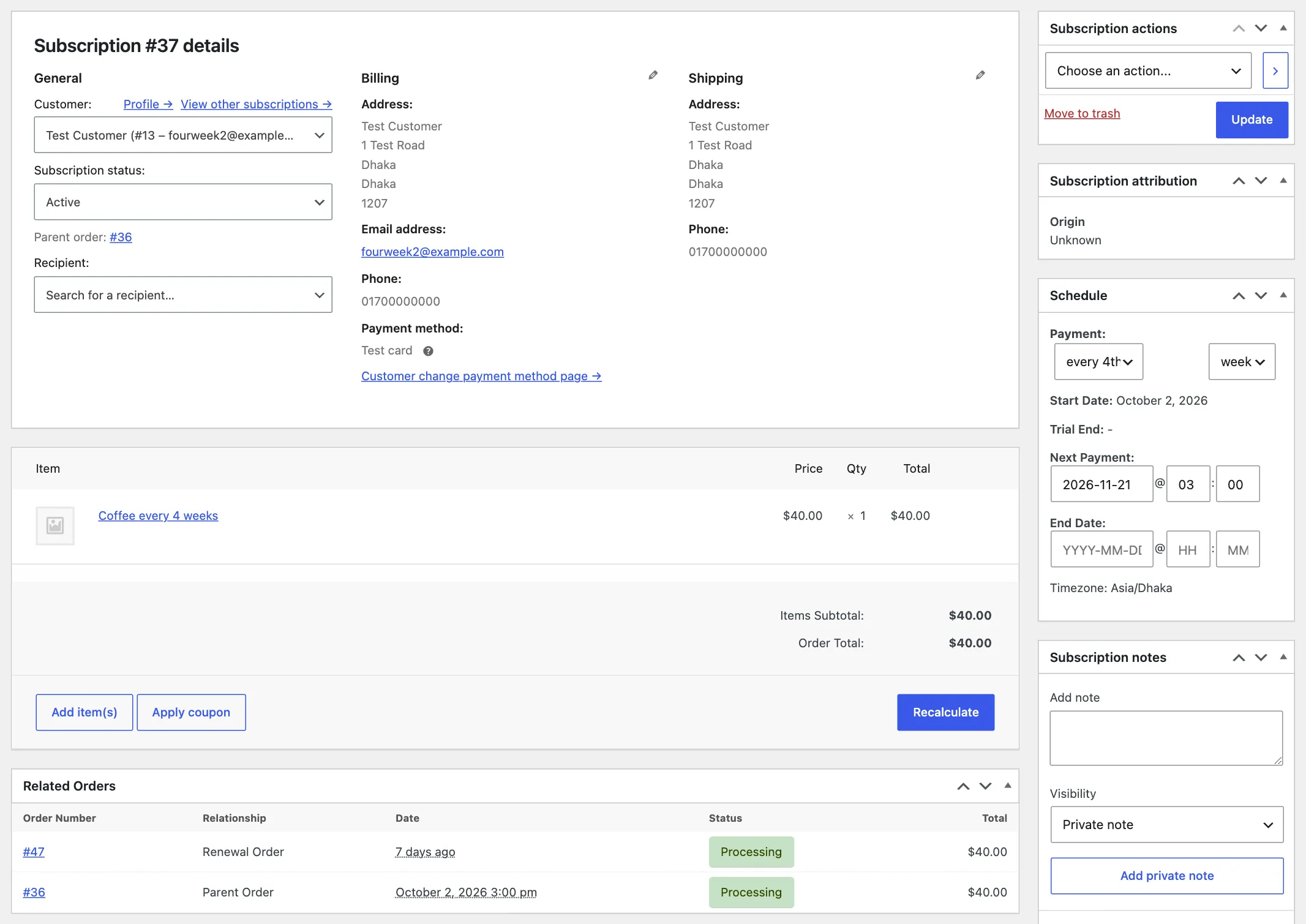
Keeping the schedule on late payments
If you’d rather every subscription kept its billing day, the renewal guide points to the Preserve Billing Schedule plugin. The same result is one filter, wcs_calculate_next_payment_from_last_payment. Returning false skips the last payment branch, so the scheduled date becomes the base.
// Purpose: Calculate the next renewal from the scheduled date instead of the date a late renewal was paid.
// Tested with: WordPress 7.1.4, WooCommerce 11.2.1, WooCommerce Subscriptions 9.3.0.
// Note: Applies to every subscription in the store.
add_filter( 'wcs_calculate_next_payment_from_last_payment', '__return_false' );
Add it to your child theme’s functions.php, or use a plugin like Code Snippets or WPCode. It needs WooCommerce Subscriptions active.
I ran the same late monthly test with the filter on. Due October 27, paid October 30, and the next payment stayed on November 27. That’s the trade: the billing day holds, and a customer who pays a week late pays again about three weeks later.
Why does a subscription from the 30th renew on the 31st?
Because of how wcs_add_months() in includes/core/wcs-time-functions.php (line 304) adds a month. If the current date is the last day of its month, or its day doesn’t exist in the next month, the result is the last day of the next month. Otherwise it’s the same day next month.
The first rule is the one to watch. Once a renewal lands on the last day of a month, every renewal after it stays on the last day. I ran wcs_add_time() the way calculate_next_payment_date() calls it, starting from my monthly sign-up on October 30:
Oct 30 -> Nov 30 -> Dec 31 -> Jan 31 -> Feb 28 -> Mar 31November 30 is the last day of November, so December gets the 31st. A subscription that starts on January 28, 2027 gets there in February instead: February 28, then March 31, then April 30. So a subscription that starts on the 28th, 29th or 30th ends up on the last day of the month, as soon as one renewal lands there.
I also checked it through the real function. A test subscription started on January 28, 2026, with its last renewal on February 28. calculate_date( 'next_payment' ) returned October 31, 2026. It started from March 31, kept adding months until the date was more than two hours away, and stayed on the last day of each month on the way.
If a store owner wants a subscription back on the 28th, editing the next payment date sets the new base, and it holds until the next renewal lands on a month end. Aligning a monthly product to a day from 1 to 27 avoids the drift for new sign-ups.
What do early renewal, manual renewal and Process renewal do?
Early renewal adds one billing interval to the scheduled next payment date, not to today. That’s WCS_Early_Renewal_Manager::get_dates_to_update() in includes/early-renewal/class-wcs-early-renewal-manager.php (line 112). If the subscription has no next payment but has an end date, it moves the end date out instead. It only shows for customers when Allow early renewal payments is on, as the early renewal guide explains.
My test subscription was due November 30. I paid an early renewal on October 30, and the next payment moved to December 31, not December 30. That’s the month-end rule again. November 30 is the last day of its month.
Manual renewals follow the same path as automatic ones, just slower. On the due date, process_renewal() puts the subscription on hold and creates a renewal order with a note that it’s awaiting customer payment. Nothing happens to the dates until the customer pays. When they do, the next date counts from that payment, like the late payment above.
The Process renewal action on the subscription screen needs more care. It fires the same woocommerce_scheduled_subscription_payment hook (see process_renewal_action_request() in includes/core/admin/class-wcs-admin-meta-boxes.php), so it creates and charges a renewal order now.
But the next payment date only gets recalculated when it’s less than two hours away. That’s the woocommerce_subscription_activation_next_payment_date_threshold filter in update_status().
I fired that hook on a subscription due November 30. The order was paid on October 30, and the next payment stayed November 30.
The guide for editing an existing subscription warns about this too. If you process a renewal by hand, move the next payment date yourself.
What happens when you edit the next payment date?
The Schedule box saves through WCS_Meta_Box_Schedule::save() in includes/core/admin/meta-boxes/class-wcs-meta-box-schedule.php. It passes UTC timestamps to update_dates(), which checks the order of the dates. The next payment has to come after the start date and the trial end, and the end date has to come after the next payment.
The date picker also won’t take a next payment less than an hour away. Then Action Scheduler moves the renewal job to the new time.
From there, the date you typed becomes the new base. On a regular subscription, the renewal that runs on that date sets the next one an interval later, like the on-time test above. On an aligned subscription, the edited date wins over the aligned day. The alignment guide says alignment only applies to the first payment, and the code agrees.
I moved my 4-week Saturday subscription to Tuesday, October 27, at 3am, and ran the renewal. The next payment came out as Tuesday, November 24, at 3am. Subscriptions didn’t pull it back to Saturday.
Which time zone are these dates in?
Three of them, depending on where you look.
Subscriptions stores every date in UTC. My box aligned to the 1st renews at 3am on November 1 in Dhaka, which the database holds as 2026-10-31 21:00:00. The Action Scheduler job runs at that UTC time. If you read a subscription’s dates through the REST API, a database export or a debug log, a renewal on a site ahead of UTC can look a day early.
The math happens in the site time zone, from Settings > General. wcs_add_months() is called with offset_site_time, so the last day of the month is the site’s last day. Aligned dates and the 3am time use the site time zone too. Most of wp-admin, like the Related Orders dates and the Next Payment column in the subscriptions list, shows dates in the site time zone.
The Schedule box is the exception. It shows and takes dates in your browser’s time zone, and the line under the box says which one. The JavaScript in assets/js/admin/meta-boxes-subscription.js reads your browser’s time zone and converts what you type to UTC before saving. The manual subscription guide says the same: these dates use the browser’s time zone, not the site’s.
I opened the same 4-week subscription in a browser set to Asia/Dhaka and one set to America/New_York. Same renewal, two different dates on screen.
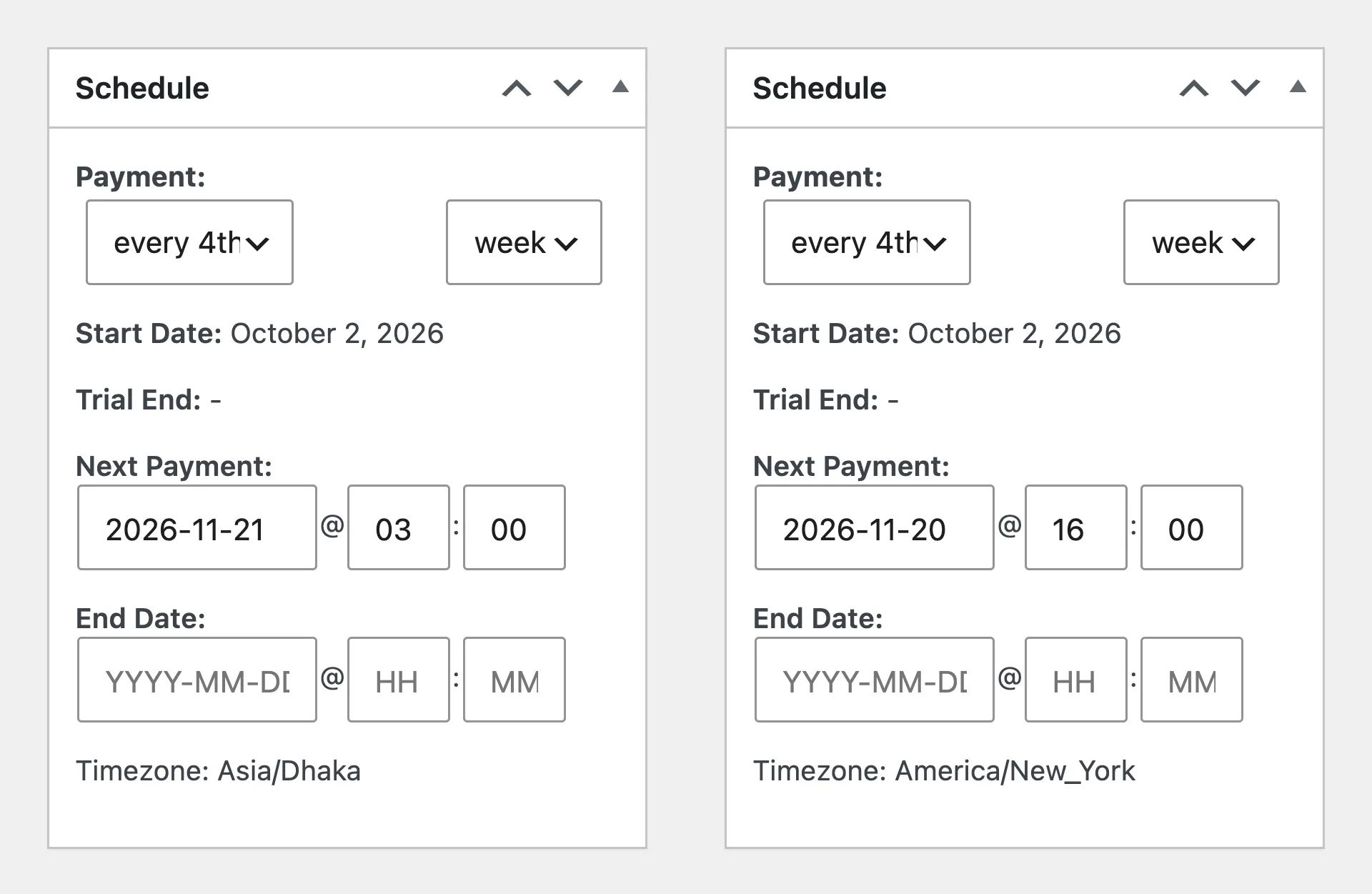
If someone editing from a browser in New York types 03:00 into that box, the renewal runs at 3am New York time, which is 2pm in Dhaka. Check the Timezone line under the box before saving a date.
How I’d check a renewal date that looks wrong
- Open the subscription and compare the Related Orders dates with the notes. If the last renewal was paid after its due date, the next date moved with it.
- Check whether the product is aligned. Aligned subscriptions keep their scheduled day, and their first date depends on First billing behavior.
- Look at the day of the month. A subscription on the 28th, 29th or 30th that now renews on the 31st has hit the month-end rule.
- Check the notes for a Process renewal or an early renewal. Process renewal leaves a future date alone, and early renewal adds a full interval to it.
- Before editing, read the Timezone line under the Schedule box.
For most subscriptions, the last paid renewal order decides the next date, so that’s the first thing I’d look at.
Did this fix work on your site?
If it didn't, tell me what happened. I re-test reported fixes and update the post.

Shameem Reza Happiness Engineer at Automattic
I fix WooCommerce problems for a living and review plugins for WordPress.org. Every fix here is tested on a clean site first.


No comments yet. Ask the first question.